
Subaru Crosstrek Owners Manual: Information display (if equipped)
NOTE
For models with color multi function display, refer to "Multi function display"
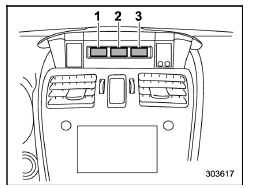
- Outside temperature indicator
- Driving information display
- Clock
With the ignition switch in the "ACC" position, the clock appears on the display.
With the ignition switch in the "ON" position, the outside temperature indicator, driving information display and clock all appear on the display.
 Steering responsive fog lights warning indicator/ Steering responsive fog
lights OFF indicator (models with EyeSight system)
Steering responsive fog lights warning indicator/ Steering responsive fog
lights OFF indicator (models with EyeSight system)
NOTE
For details about the steering responsive
fog lights system, refer to "Steering
responsive fog lights system (models
with EyeSight system)"
Steering responsive fog lights
warning indicato ...
 Outside temperature indicator
U.S.-spec. models
Except U.S.-spec. models
The outside temperature indicator shows
the outside temperature in a range from
−40 to 1228F (−40 to 508C).
The indicator can gi ...
Other materials:
Auto light sensor sensitivity setting
1. Perform the preparation steps according
to "Preparation for car settings"
2. Operate the " " or "
" switch to
select the "Auto Light Sensor" item. Then
push the button.
3. The current setting will be displayed.
Push the button to enter the
selection
mode.
4. Selec ...
Air conditioner control
The air conditioner operates only when
the engine is running.
Press the air conditioner button while the
fan is in operation to turn on the air
conditioner. When the air conditioner is
on, the "A/C" indicator light illuminates.
To turn off the air conditioner, press the
button again.
NOT ...
Driving tips
Do not drive with your foot resting on the
clutch pedal and do not use the clutch to
hold your vehicle at a standstill on an
upgrade. Either of those actions may
cause clutch damage.
Do not drive with your hand resting on the
shift lever. This may cause wear on the
transmission components.
...
