
Subaru Crosstrek Owners Manual: Driving information display
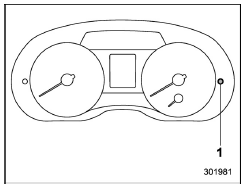
- Information display selection knob
With the ignition switch in the "ON"
position, each successive press of the
information display selection knob
switches the display in the following sequence.
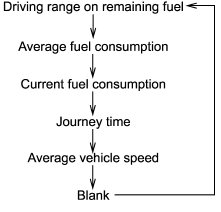
- Driving range on remaining fuel
- Average fuel consumption
- Journey time
- Average vehicle speed
- Turn off display of driving information display
 Outside temperature indicator
U.S.-spec. models
Except U.S.-spec. models
The outside temperature indicator shows
the outside temperature in a range from
−40 to 1228F (−40 to 508C).
The indicator can gi ...
 Driving range on remaining fuel
U.S.-spec. models
Except U.S.-spec. models
The driving range indicates the distance
that can be driven taking into account the
amount of fuel remaining in the tank and
the average rate ...
Other materials:
Wiring diagram
SECURITY AND LOCKS > Push Button Start SystemWIRING DIAGRAMFor wiring diagrams related to the push button start system (ignition change), refer to the following items.• Keyless access system: Keyless Access System > WIRING DIAGRAM">• Push button start system: Push Button ...
Inspection
MANUAL TRANSMISSION AND DIFFERENTIAL(5MT) > Transmission Gear OilINSPECTION1. Park the vehicle on a level surface.2. Turn the ignition switch to OFF, and wait until the engine cools.3. Remove the oil level gauge and wipe it clean.4. Reinsert the oil level gauge all the way. Be sure that the oil l ...
Head restraint adjustment
Both the rear window side seats and the
rear center seat are equipped with head
restraints.
WARNING
Never drive the vehicle with the
head restraints removed because
they are designed to reduce the
risk of serious neck injury in the
event that the vehicle is struck
from the rear. The ...
