
Subaru Crosstrek Owners Manual: Average vehicle speed
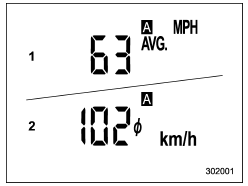
- U.S.-spec. models
- Except U.S.-spec. models
This display shows the average vehicle speed since the trip meter was last reset.
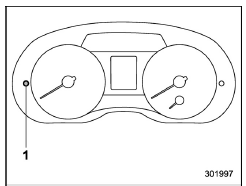
- Trip knob
Pressing the trip knob toggles the display between the average vehicle speed corresponding to the A trip meter display and the average vehicle speed corresponding to the B trip meter display.
When either of the trip meter displays is reset, the corresponding average vehicle speed value is also reset.
NOTE
When either trip meter display is reset, the average vehicle speed corresponding to that trip meter display is not shown until the vehicle has subsequently covered a distance of 1 mile (or 1 km).
 Journey time
The journey time shows the time that has
elapsed since the ignition switch was
turned to the "ON" position.
The journey time indication flashes each
time a complete hour has elapsed. If th ...
 Turn off display of driving information
display
Turn off display of driving information
display
The driving information display can be
turned off.
To turn off the display, turn the ignition
switch to the "LOCK"/"OFF" position and
press the "+" button adjacent to the clock
display for appr ...
Other materials:
Removal
BRAKE > Rear Disc RotorREMOVAL1. Lift up the vehicle, and then remove the rear wheels.2. Release the lever assembly - hand brake.3. Remove the caliper body assembly from the housing assembly - rear axle.(1) Remove the bolt from the brake hose bracket.(2) Remove the mounting bolt, and remove the c ...
Memory function
The Subaru Ascent power rear gate is equipped with a convenient memory function
that allows you to store a preferred opening height for everyday use. This feature
is especially useful in garages or areas with limited vertical clearance.
Registration of the rear gate height
To set and save your ...
Dtc p0507 idle control system rpm - higher than expected
ENGINE (DIAGNOSTICS)(H4DO) > Diagnostic Procedure with Diagnostic Trouble Code (DTC)DTC P0507 IDLE CONTROL SYSTEM RPM - HIGHER THAN EXPECTEDDTC DETECTING CONDITION:Detected when two consecutive driving cycles with fault occur.TROUBLE SYMPTOM:Engine keeps running at higher speed than specified idl ...
