
Subaru Crosstrek Owners Manual: To arm the system using access key/remote transmitter
1. Close all windows and the moonroof (if equipped).
2. Remove the key from the ignition switch (models without "keyless access with push-button start system")/turn the push-button ignition switch to the "OFF" position (models with "keyless access with push-button start system").
3. Open the doors and get out of the vehicle.
4. Make sure that the engine hood is locked.
5. Close all doors (and the rear gate).
Access key
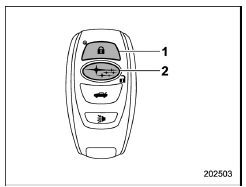
- Arm button: Press to arm the system
- Disarm button: Press to disarm the system
Transmitter
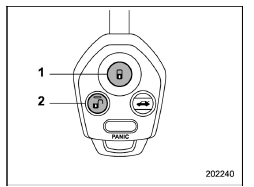
- Arm button: Press to arm the system
- Disarm button: Press to disarm the system
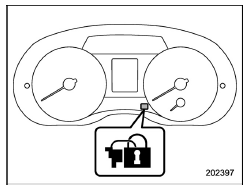
Security indicator light (type A)
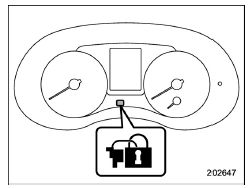
Security indicator light (type B)
6. Briefly press the "  " button
(for less
than 2 seconds). All doors (and the rear
gate) will lock, an electronic chirp will
sound once, the hazard warning flashers
will flash once, and the security indicator
light will start flashing rapidly. After rapid
flashing for 30 seconds (standby time), the
indicator lights will then flash slowly (twice
approximately every 2 seconds), indicating
that the system has been armed for
surveillance.
" button
(for less
than 2 seconds). All doors (and the rear
gate) will lock, an electronic chirp will
sound once, the hazard warning flashers
will flash once, and the security indicator
light will start flashing rapidly. After rapid
flashing for 30 seconds (standby time), the
indicator lights will then flash slowly (twice
approximately every 2 seconds), indicating
that the system has been armed for
surveillance.
If any of the doors, including the rear gate, is not fully closed, an electronic chirp sounds five times, the hazard warning flashers flash five times to alert you that the doors (or the rear gate) are not properly closed. When you close the door, the system will automatically arm and doors will automatically lock.
 Tips
Tips
The system can be armed even if the
engine hood, windows and/or moonroof
are open. Always make sure that they are
fully closed before arming the system.
The 30-second standby time can be
...
 To arm the system using power door locking switches
1. Close all windows.
2. Remove the key from the ignition
switch (models without "keyless access
with push-button start system")/turn the
push-button ignition switch to the "OFF"
position (mode ...
Other materials:
Adjustment
LIGHTING SYSTEM > Front Fog Light AssemblyADJUSTMENT1. FOG LIGHT AIMING1. Before checking the fog light assembly - front beam level, be sure of the following:• The area around the fog light assembly - front has not sustained any scratches, damage or other type of deformation.• The veh ...
Audio system Wiring diagram
WIRING SYSTEM > Audio SystemWIRING DIAGRAM1. 6.2-INCH DISPLAY2. 7 INCH DISPLAY (WITHOUT TELEMATICS)3. 7 INCH DISPLAY (WITH TELEMATICS) ...
Vehicle Dynamics Control system
WARNING
Even when driving a Subaru Ascent equipped with the Vehicle Dynamics Control
system, always remain attentive and cautious. Relying too heavily on electronic
assistance systems can lead to dangerous situations and potentially serious accidents.
CAUTION
Although the Subaru Ascent is ...
