
Subaru Crosstrek Owners Manual: Switching power status
1. Apply the parking brake.
2. Shift the select lever into the "P" position.
3. Depress the brake pedal.
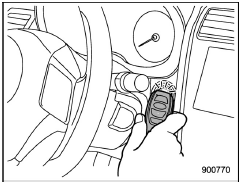
4. Hold the access key with the buttons facing you, and touch the push-button ignition switch with it.
When the communication between the access key and the vehicle is completed, a chime (ding) will sound. At the same time, the status of the push-button ignition switch changes to either of the following.
- When the keyless access with pushbutton start system is deactivated: "ACC"
- Under other conditions: "ON"
5. When the keyless access with push-button start system is deactivated, press the push-button ignition switch with the brake pedal released. The status of the push-button ignition switch then changes to "ON".
NOTE
If the power status does not switch even though the above procedure was followed precisely, contact your SUBARU dealer.
 Locking and unlocking
Release button
Mechanical key
While pressing the release button of the
access key, take out the mechanical key.
Lock or unlock the driver's door with the
mechanical key in the procedu ...
 Starting engine
1. Apply the parking brake.
2. Shift the select lever into the "P"
position.
3. Depress the brake pedal.
4. Hold the access key with the buttons
facing you, and touch the push-button
ign ...
Other materials:
Dtc b27a8 trunk/rear gate external antenna open
KEYLESS ACCESS WITH PUSH BUTTON START SYSTEM (DIAGNOSTICS) > Diagnostic Procedure with Diagnostic Trouble Code (DTC)DTC B27A8 TRUNK/REAR GATE EXTERNAL ANTENNA OPENDTC detecting condition:When open circuit occurs in the harness between keyless access CM and rear exterior antenna.Trouble symptom:Ke ...
Installation
STARTING/CHARGING SYSTEMS(H4DO) > Battery Current & Temperature SensorINSTALLATION1. BATTERY CURRENT SENSORInstall in the reverse order of removal.Tightening torque: General Description > COMPONENT">3 N·m (0.3 kgf-m, 2.2 ft-lb)2. BATTERY TEMPERATURE SENSORInstall in the reve ...
Dtc b1677 satellite safing sensor initialization incomplete
AIRBAG SYSTEM (DIAGNOSTICS) > Diagnostic Chart with Trouble CodeDTC B1677 SATELLITE SAFING SENSOR INITIALIZATION INCOMPLETEDiagnosis start condition:Ignition voltage is 10 V to 16 V.DTC detecting condition:• Open or short circuit in harness of satellite safing sensor• Satellite safing ...
