
Subaru Crosstrek Owners Manual: Starting engine
1. Apply the parking brake.
2. Shift the select lever into the "P" position.
3. Depress the brake pedal.
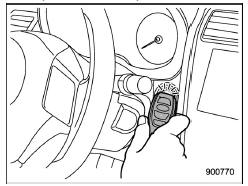
4. Hold the access key with the buttons facing you, and touch the push-button ignition switch with it.
When the communication between the access key and the vehicle is completed, a chime (ding) will sound. At the same time, the push-button ignition switch turns to the "ACC" or "ON" position.
5. After the push-button ignition switch turns to the "ACC" or "ON" position, while depressing the brake pedal, press the push-button ignition switch.
NOTE
If the engine does not start even though the above procedure was followed precisely, contact your SUBARU dealer.
 Switching power status
1. Apply the parking brake.
2. Shift the select lever into the "P"
position.
3. Depress the brake pedal.
4. Hold the access key with the buttons
facing you, and touch the push-button
ign ...
 Rear gate - if the rear gate cannot be opened
In the event that you cannot open the rear
gate by operating the rear gate opener
button, you can open it from inside the
cargo area.
1. Remove the access cover at the
bottom-center of the re ...
Other materials:
Ignition timing Inspection
MECHANICAL(H4DO) > Ignition TimingINSPECTIONCAUTION:After warming-up, engine becomes very hot. Be careful not to burn yourself at measurement.1. Before checking the ignition timing, check the following item:(1) Check the air cleaner element is free from clogging, spark plugs are in good condition ...
Installation
SECURITY AND LOCKS > Accessory Relay (Push Button Start)INSTALLATIONCAUTION:Before handling the airbag system components, refer to “CAUTION” of “General Description” in “AIRBAG SYSTEM”. General Description > CAUTION">Install each part in the reverse ...
BSD/RCTA approach indicator light
BSD/RCTA approach indicator light
It is mounted on each side of the outside
mirrors.
The indicator light will illuminate when a
vehicle approaching from behind is detected.
The indicator light will flash to warn the
driver of dangers under the following
conditions.
While the indic ...
