
Subaru Ascent 2018-2026 Owner's Manual: Replacement of wiper blades
Contamination such as grease, wax residues, insects, or road debris on the windshield or wiper blades of your Subaru Ascent can lead to uneven wiping, jerky motion, and visible streaks across the glass. If these issues persist even after using the washer system, thoroughly clean the windshield and rear window using a soft sponge or cloth along with a neutral detergent or a mild abrasive cleaner.
However, when cleaning the rubber elements of the wiper blades on your Subaru Ascent, use only a soft cloth or sponge without any detergent. Harsh cleaning agents can degrade the rubber material and reduce wiping performance.
Avoid applying excessive force when wiping the blade rubber. Strong rubbing may damage the protective coating, leading to deterioration and causing the wipers to vibrate or skip during operation. After cleaning, inspect the rubber to ensure it is properly secured and undamaged.
Once cleaning is complete, rinse both the windshield and wiper blades with clean water. Continue rinsing until water spreads evenly across the glass surface without forming droplets, indicating that the surface is completely clean and ready for optimal wiper performance in your Subaru Ascent.
CAUTION
- Do not use gasoline, paint thinner, benzine, or other solvents to clean the wiper blades of your Subaru Ascent, as these substances can cause rapid deterioration of the rubber material.
- When removing the wiper blades, never allow the wiper arms to snap back against the windshield. This may result in scratches or cracks in the glass surface.
- Always return the wiper arms to their resting position gently by hand. Allowing the spring mechanism to snap them down may deform the arms or damage the windshield of your Subaru Ascent.
If streaking or poor wiping performance continues after cleaning, it is recommended to replace the wiper blades following the procedure below.
Windshield wiper blade assembly
1. Carefully lift the wiper arm away from the windshield of your Subaru Ascent.
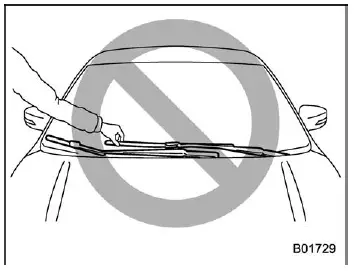
CAUTION
Always hold the wiper arm itself when replacing the blade. Holding the blade may cause deformation and reduce effectiveness.
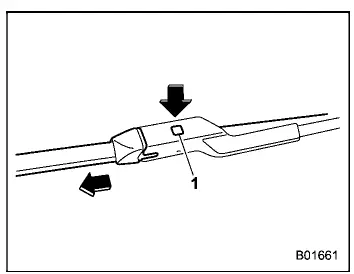
- Lock knob
2. Firmly hold the connection point of the wiper blade, press the lock knob to release the mechanism, and then slide the blade assembly out of the wiper arm.
NOTE
Avoid using hard or sharp tools to press the lock knob, as this may scratch or damage the locking mechanism.
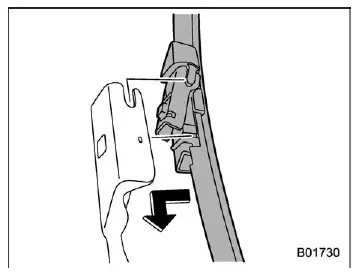
3. To install a new wiper blade on your Subaru Ascent, align the blade assembly with the connection point on the wiper arm and slide it into position until it locks securely.
After installation, verify that the blade is properly attached and cannot be easily detached from the arm.
4. Carefully lower the wiper arm back onto the windshield, ensuring a controlled and gentle placement to avoid damage.
Window wiper blade rubber
Maintaining clean and properly functioning wiper blades on your Subaru Ascent is essential for clear visibility in all weather conditions. Regular inspection and timely replacement will ensure consistent performance and safer driving.
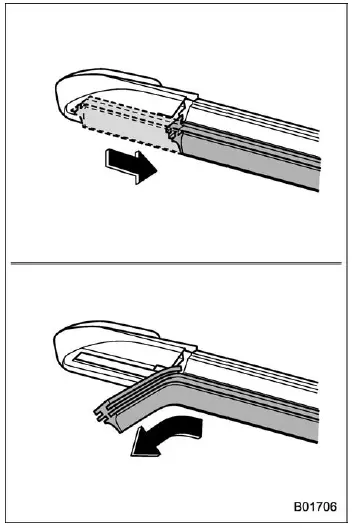
To maintain clear visibility in your Subaru Ascent, replace the wiper blade rubber using the procedure outlined below whenever performance declines or streaking persists.
1. Carefully pull the wiper blade rubber until the slit on the underside of the blade aligns with the designated removal position, as illustrated. This alignment allows the rubber to be released safely from the blade frame.
2. Gently pull the end of the wiper blade rubber through the slit and slide it out of the blade assembly.
3. To install a new rubber insert in your Subaru Ascent, reverse the removal steps. After installation, confirm that the rubber extends fully to the end cap and is securely seated within the blade frame to ensure proper wiping performance.
NOTE
Replacing only the rubber insert can sometimes be difficult due to tight fitment. If you are unsure, it is recommended to have the work performed by an authorized SUBARU dealer for your Subaru Ascent.
Rear window wiper blade assembly
1. Lift the rear wiper arm away from the rear window of your Subaru Ascent.
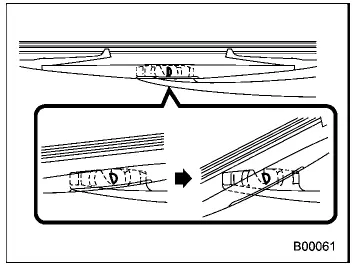
2. Rotate the rear wiper blade assembly counterclockwise to release it from its locked position.
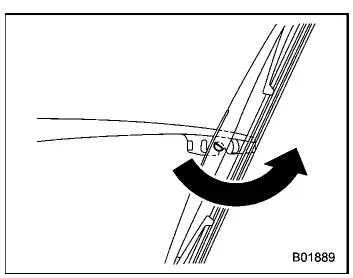
3. Pull the blade assembly outward toward you to detach it from the wiper arm.
4. Install the new or serviced wiper blade assembly onto the arm, ensuring that it clicks firmly into place and is properly secured.
5. Carefully lower the wiper arm back onto the rear window surface by hand to prevent damage to the glass or arm mechanism.
Rear window wiper blade rubber
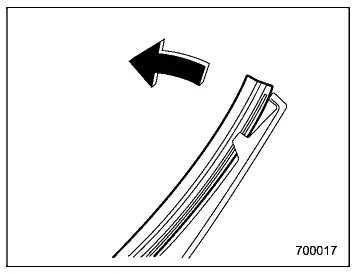
1. Pull the end of the rear blade rubber outward to release it from the locking tabs of the plastic support structure.
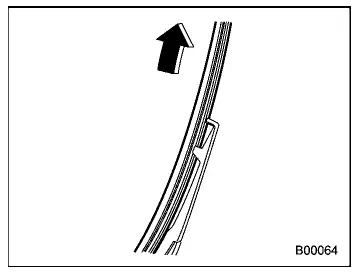
2. Slide the entire blade rubber assembly out of the plastic support.
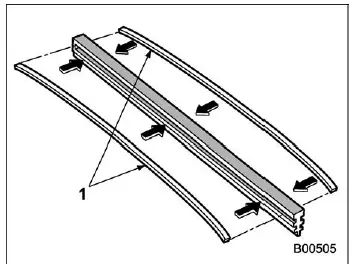
- Metal spines
3. If the replacement rubber for your Subaru Ascent does not include metal reinforcement spines, carefully remove them from the old blade and insert them into the new rubber to maintain proper rigidity and wiping pressure.
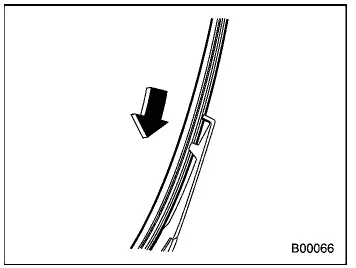
4. Align the grooves in the rubber with the guide claws on the plastic support, then slide the rubber assembly into place until fully seated.
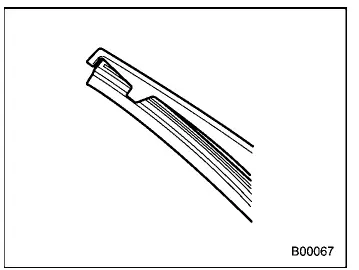
Ensure that both ends of the rubber are firmly secured by the retaining stoppers. Improper installation may cause the blade to move out of position and potentially scratch the rear window glass of your Subaru Ascent.
5. Reattach the rear wiper blade assembly to the arm, ensuring it locks securely.
6. Lower the wiper arm gently back into its resting position on the rear window.
Regular inspection and timely replacement of wiper blade components in your Subaru Ascent will ensure consistent visibility and safe driving performance in all weather conditions.
 Windshield washer fluid
When the windshield washer fluid level in your Subaru Ascent becomes low, the
dedicated warning indicator will illuminate on the instrument panel. This alert
signals that the washer fluid rese ...
 Battery
WARNING
Never expose the battery in your Subaru Ascent to open flames or sparks.
The battery emits highly flammable gases that can ignite and cause an
explosion if exposed to ignition s ...
Other materials:
Removal
AIRBAG SYSTEM > Passenger’s Airbag ModuleREMOVALCAUTION:Before handling the airbag system components, refer to “CAUTION” of “General Description” in “AIRBAG SYSTEM”. General Description > CAUTION">1. Turn the ignition switch to OFF.2. Disconne ...
Moonroof
WARNING
When operating the moonroof in your Subaru Ascent, never allow any part of
a person’s body—such as hands, arms, or head—or any external objects to extend outside
the opening. This safety precaution is critical, as serious injury may occur under
various driving conditions.
Du ...
Installation
AIRBAG SYSTEM > Curtain Airbag SensorINSTALLATIONCAUTION:• Do not reuse the bolt and nut.Always replace with the specified new bolts and nuts.• When installing the sensor, insert the set pin on the backside of the sensor into the hole on the body side securely.1. Before installation, ...
