
Subaru Crosstrek Service Manual: Removal
SECURITY AND LOCKS > Front Outer Handle
REMOVAL
1. Raise the glass assembly - front door to the top position.
2. Disconnect the ground cable from battery and wait for at least 60 seconds before starting work. NOTE">
3. Remove the trim panel - front door. Door Trim > REMOVAL">
4. Remove the sealing cover - front door. Front Sealing Cover > REMOVAL">
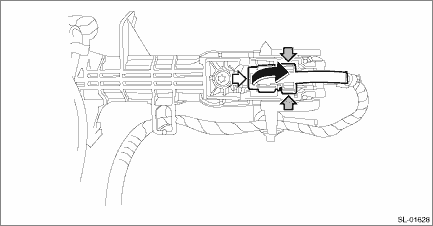
5. Remove the holder of the frame assembly - front door outer.

NOTE:
For model with keyless access with push button start, disconnect the harness clip and exterior antenna (touch sensor) connector.
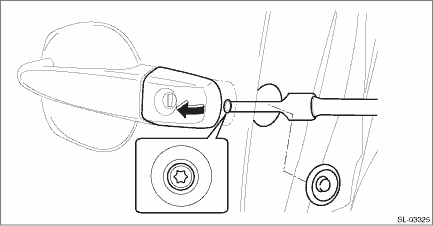
6. Remove the cover - handle front outer.
Preparation tool:
TORX® T30
(1) Remove the plug at the rear end of the panel assembly - front door.
(2) Loosen the TORX® bolt and remove the cover - handle front outer.
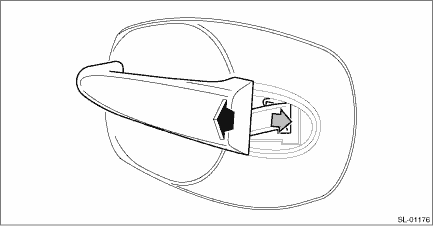
7. Remove the handle - door outer by moving it rearward.
CAUTION:
Do not apply excessive force to remove the handle - door outer from the panel assembly - front door. The panel assembly - front door may be deformed.
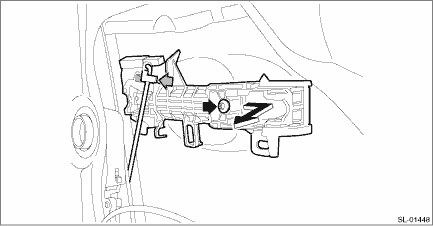
8. Remove the frame assembly - front door outer.
Preparation tool:
TORX® T30
(1) Remove the spacer - door handle outer.
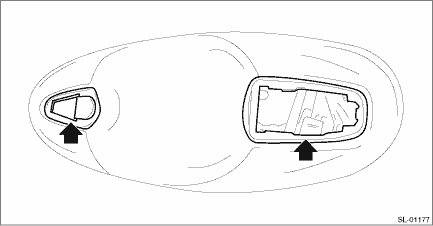
(2) Remove the rod from the rod clamp of the frame assembly - front door outer.
(3) Loosen the TORX® bolt and remove the frame assembly - front door outer from inside the panel assembly - front door.
 Inspection
SECURITY AND LOCKS > Front Outer HandleINSPECTIONCheck if the outer handle operates normally.• If the lever is faulty, replace the handle - door outer.• If the rod is deformed, replace ...
 Installation
SECURITY AND LOCKS > Front Outer HandleINSTALLATION1. Before installation, check the following items.• Rod is free from deformation.• Grease is applied sufficiently to rod joints.If gre ...
Other materials:
Operation
EyeSight (DIAGNOSTICS) > Freeze Frame Data DisplayOPERATION1. On «Start» display, select «Diagnosis».2. On «Vehicle selection» display, input the target vehicle information and select «Confirmed».3. On «Main Menu» display, select «Each System».4. On «Select System» display, select  ...
Electronic Brake Force Distribution
(EBD) system warning
The brake system warning light also
illuminates if a malfunction occurs in the
EBD system. In that event, it illuminates
together with the ABS warning light.
The EBD system may be malfunctioning if
the brake system warning light and ABS
warning light illuminate simultaneously
during driving ...
List of diagnostic trouble code (dtc) List
LAN SYSTEM (DIAGNOSTICS) > List of Diagnostic Trouble Code (DTC)LISTDTCItemContent of diagnosisNoteU1201CAN-HS COUNTER ABNORMALHigh speed CAN communication error Diagnostic Procedure with Diagnostic Trouble Code (DTC) > DTC U1201 CAN-HS COUNTER ABNORMAL">U0073CONTROL MODULE COMMUNICATI ...
