
Subaru Crosstrek Service Manual: Removal
MANUAL TRANSMISSION AND DIFFERENTIAL(5MT) > Reverse Idler Gear
REMOVAL
1. Remove the manual transmission assembly from the vehicle. Manual Transmission Assembly > REMOVAL">
2. Remove the back-up light switch and the neutral position switch. Switches and Harness > REMOVAL">
3. Remove the transfer case together with the extension case assembly. Transfer Case and Extension Case Assembly > REMOVAL">
4. Remove the transmission case. Transmission Case > REMOVAL">
5. Remove the drive pinion shaft assembly. Drive Pinion Shaft Assembly > REMOVAL">
6. Remove the main shaft assembly. Main Shaft Assembly > REMOVAL">
7. Remove the front differential assembly. Front Differential Assembly > REMOVAL">
8. Remove the shifter forks and rods. Shifter Fork and Rod > REMOVAL">
9. Pull out the straight pin, and remove the reverse idler gear shaft, adjusting washer, reverse idler gear and washer.
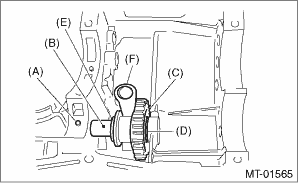
(A) | Straight pin |
(B) | Reverse idler gear shaft |
(C) | Reverse idler gear |
(D) | Adjusting washer |
(E) | Reverse idler gear washer |
(F) | Reverse shifter lever |
10. Remove the reverse shifter lever.
 Adjustment
MANUAL TRANSMISSION AND DIFFERENTIAL(5MT) > Reverse Idler GearADJUSTMENT1. Select the appropriate reverse shifter lever from the table below, and adjust until the clearance between the reverse idle ...
 Inspection
MANUAL TRANSMISSION AND DIFFERENTIAL(5MT) > Reverse Idler GearINSPECTION1. Move the reverse shifter rod toward the reverse side. Check the clearance between the reverse idler gear and the transmiss ...
Other materials:
Symbols in wiring diagrams
WIRING SYSTEM > Basic Diagnostic ProcedureSYMBOLS IN WIRING DIAGRAMSA number of symbols are used in each wiring diagram to easily identify parts or circuits.1. RELAYA symbol used to indicate a relay.2. CONNECTOR 1The sketch of the connector indicates the one-pole types.3. WIRING CONNECTIONSome wi ...
By Dialpad
Input the phone number manually using
the keypad displayed on the screen.
Phone (Dialpad) screen
Allow you to enter numbers from 0 to
9 and *, #, and +. To enter "+", press
and hold the "0" key.
Delete one character from the entered
characters.
Switch the screen to the phone
(m ...
Using the voice command system
Steering switch
Talk switch
Action
Function
Press
Start the voice command
system.
Press and hold
Cancel voice recognition.
Microphone
Type A
Type B
It is unnecessary to speak directly into the
microphone when giving a command.
NOTE
Wait ...
