
Subaru Crosstrek Owners Manual: Using the voice command system
Steering switch
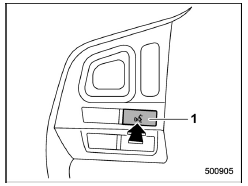
- Talk switch
| Action | Function |
| Press | Start the voice command system. |
| Press and hold | Cancel voice recognition. |
Microphone
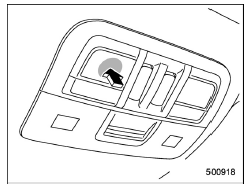
Type A
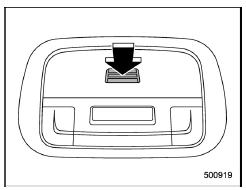
Type B
It is unnecessary to speak directly into the microphone when giving a command.
NOTE
Wait for the confirmation beep before speaking a command.
Voice commands may not be recognized if:
- Spoken too quickly.
- Spoken at a low or high volume.
- The moonroof or windows are open.
- Passengers are talking while voice commands are spoken.
- The air conditioning speed is set high.
- The air conditioning vents are turned towards the microphone.
In the following conditions, the system may not recognize the command properly and using voice commands may not be possible:
- The command is incorrect or unclear. Note that certain words, accents or speech patterns may be difficult for the system to recognize.
- There is excessive background noise, such as wind noise.
 Voice command system
The voice command system enables the
audio, hands-free phone system, etc. to
be operated using voice commands.
Refer to the "Command list" F5-84 for
samples of voice commands.
Voice commands ...
 Voice command system operation
1. Press the talk switch on the steering
wheel.
After the voice command top screen has
been displayed, speech guidance will
commence.
NOTE
When the voice command mode is
audio mode, voice ...
Other materials:
Installation
EXTERIOR/INTERIOR TRIM > Roof MoldingINSTALLATION1. Remove the clips from the molding - roof, and attach to the studs on the vehicle.CAUTION:• Always replace the clips that were damaged during removal of the molding - roof with new parts.• While installing the molding - roof, be caref ...
Removal
MECHANICAL(H4DO) > CamshaftREMOVAL1. CAMSHAFT RHThe camshaft RH and cam carrier are designed as removing as a unit. Refer to “Cam Carrier” for removal procedures of camshaft RH. Cam Carrier > REMOVAL"> Cam Carrier > DISASSEMBLY">2. CAMSHAFT LHThe camshaft LH an ...
Inspection
FUEL INJECTION (FUEL SYSTEMS)(H4DO) > Electronic Throttle Control RelayINSPECTION1. Check that the electronic throttle control relay has no deformation, cracks or other damages.2. Measure the resistance between electronic throttle control relay terminals.Terminal No.Standard1 and 21 M? or more3 a ...
