
Subaru Crosstrek Service Manual: Removal
LIGHTING SYSTEM > Headlight Assembly
REMOVAL
CAUTION:
• Do not perform work with wet hands, because there is a possibility of electrical shock.
• The HID type uses very high voltages for the lighting circuit. Make sure that the power supply is turned OFF before working.
1. Disconnect the ground cable from battery. NOTE">
2. Remove the air intake duct. (When removing RH side) Air Intake Duct > REMOVAL">
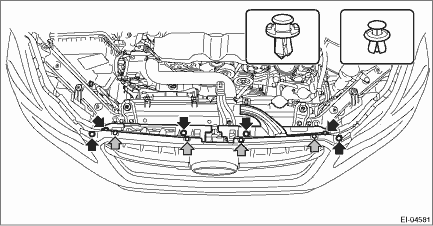
3. Remove the clip, and remove the bracket - grille.
CAUTION:
To prevent damage to the bracket - grille, make sure to remove all clips.
4. Remove the bumper face - front. Front Bumper > REMOVAL">
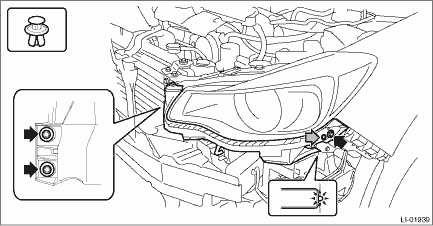
5. Remove the bolts and clips, and remove the bracket - front bumper corner.
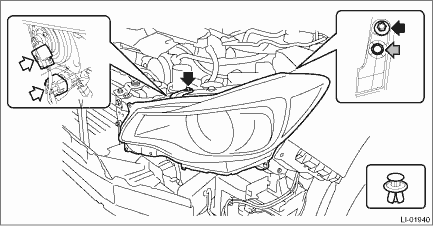
6. Remove the light assembly - head.
(1) Disconnect the connector.
(2) Remove the bolts and clips, and remove the light assembly - head.
 Adjustment
LIGHTING SYSTEM > Headlight AssemblyADJUSTMENT1. HEADLIGHT BEAM ADJUSTMENTCAUTION:• Turn off the light before adjusting the beam level of the light assembly - head. If it is necessary to insp ...
 Assembly
LIGHTING SYSTEM > Headlight AssemblyASSEMBLY1. HID HEADLIGHT BALLASTCAUTION:• When installing the ballast - headlight, be sure to install the gasket.• After installing the ballast to th ...
Other materials:
Dtc b2814 power supply low voltage
EyeSight (DIAGNOSTICS) > Diagnostic Procedure with Diagnostic Trouble Code (DTC)DTC B2814 POWER SUPPLY LOW VOLTAGEDetected when the status of 7.0 V or less continues approximately for 5 seconds and is judged to be low-voltage malfunction, or when the +B harness of the stereo camera is broken.DTC ...
Removal
MANUAL TRANSMISSION AND DIFFERENTIAL(5MT) > Manual Transmission AssemblyREMOVAL1. Disconnect the ground cable from battery.2. Remove the clip (A) from the air intake boot.3. Loosen the clamp (B) connecting the air intake boot and air cleaner case (rear).4. Loosen the clamp (C) which connects the ...
Procedure
ENGINE (DIAGNOSTICS)(H4DO) > Diagnostics for Engine Starting FailurePROCEDURE1. Check of the fuel amount↓2. Inspection of starter motor circuit Diagnostics for Engine Starting Failure > STARTER MOTOR CIRCUIT">↓3. Inspection of ECM power supply and ground line Diagnostics fo ...
