
Subaru Crosstrek Service Manual: Removal
EXTERIOR/INTERIOR TRIM > Door Trim
REMOVAL
1. FRONT DOOR
1. Disconnect the ground cable from battery. NOTE">
2. Remove the trim panel - front door.
(1) Attach the protective tape (a).
(2) Open the cover and remove the screw.
(3) Remove the clips, and remove the trim panel - front door from the panel assembly - front door.
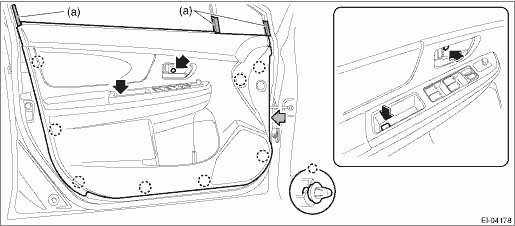
NOTE:
It is easier to remove the door trim if the removal is performed from the gray arrow section.
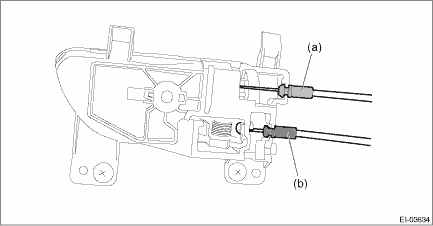
(4) Detach the door lock cable (a) and door open cable (b) from the remote assembly - door.
(5) Disconnect the harness connector and remove the trim panel - front door.
3. Remove each part as required.
• Remote assembly - door: Front Inner Remote > REMOVAL">
• Switch - power window main: Power Window Control Switch > REMOVAL">
• Weather strip - door INN: Door Trim > DISASSEMBLY">
2. REAR DOOR
1. Disconnect the ground cable from battery. NOTE">
2. Remove the trim panel - rear door.
(1) Attach the protective tape (a).
(2) Open the cover and remove the screw.
(3) Remove the clips, and remove the trim panel - rear door from the panel assembly - rear door.
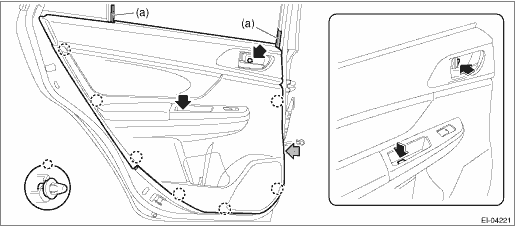
NOTE:
It is easier to remove the door trim if the removal is performed from the gray arrow section.
(4) Detach the door lock cable (a) and door open cable (b) from the remote assembly - door.
(5) Disconnect the harness connector and remove the trim panel - rear door.
3. Remove each part as required.
• Remote assembly - door: Rear Inner Remote > REMOVAL">
• Switch - power window sub: Power Window Control Switch > REMOVAL">
• Weather strip - door INN: Door Trim > DISASSEMBLY">
 Assembly
EXTERIOR/INTERIOR TRIM > Door TrimASSEMBLY1. Bend the claws while pushing the weather strip - door INN against the door trim so that there is no gap.CAUTION:Beware of the direction of folding the c ...
 Disassembly
EXTERIOR/INTERIOR TRIM > Door TrimDISASSEMBLY1. Remove the door trim.2. Remove the rivets and claws, and remove the weather strip - door INN from the door trim.(a)Rivet(b)Claw(c)ClawNOTE:Remove the ...
Other materials:
Basic diagnostic procedure Procedure
EyeSight (DIAGNOSTICS) > Basic Diagnostic ProcedurePROCEDURECAUTION:• Start the diagnosis after the engine has started. (Cruise control main switch does not turn on even if it is pressed before the engine starts.)• When performing diagnosis, observe the legal speed limit on the road.& ...
Preparation tool
AIRBAG SYSTEM > General DescriptionPREPARATION TOOL1. SPECIAL TOOL• TEST HARNESS NILLUSTRATIONTOOL NUMBERDESCRIPTIONREMARKS98299SA000TEST HARNESS NUsed for unit inspection of steering roll connector.• TEST HARNESS QILLUSTRATIONTOOL NUMBERDESCRIPTIONREMARKS98299SA040TEST HARNESS QUsed ...
Manual transmission
The manual transmission is a fully synchromeshed,
5-forward-speed and 1-reverse-
speed transmission.
The shift pattern is shown on the shift
lever knob. When shifting from 5th gear to
reverse gear, first return the shift lever to
the neutral position then shift into reverse
gear.
To ...
