
Subaru Crosstrek Service Manual: Installation
EXTERIOR BODY PANELS > Front Hood
INSTALLATION
CAUTION:
The hood COMPL - front is heavy. When removing or installing the hinge COMPL - front hood, be sure to work in a group of two or more.
1. To install the insulator - front hood and the seal - front duct, follow the removal procedure in the reverse order.
2. Align the alignment marks (A), and install the striker - front hood to the hood COMPL - front.
CAUTION:
When installing the striker - front hood, make sure that the front and rear sides are positioned in a correct direction.
Tightening torque:
33 N·m (3.36 kgf-m, 24.3 ft-lb)
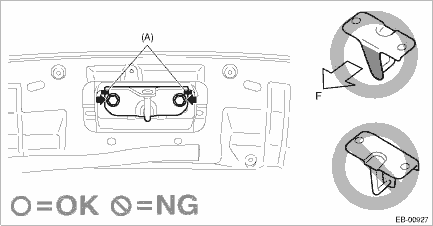
(A) | Alignment mark | F | Front side of vehicle |
NOTE:
It is not necessary to adjust the striker - front hood because there is no span of adjustable range.
3. Install the hinge COMPL - front hood to the vehicle body. (When the hinge COMPL - front hood is removed)
4. Temporarily install the hood COMPL - front to the hinge COMPL - front hood.
NOTE:
When installing the hood COMPL - front, make sure that a uniform clearance is created around it.
5. Adjust the clearance around the hood COMPL - front. Front Hood > ADJUSTMENT">
6. Tighten the bolts and nuts of the hinge COMPL - front hood.
Tightening torque:
25 N·m (2.55 kgf-m, 18.4 ft-lb)
7. Install each part of the hood COMPL - front in the reverse order of removal.
• Insulator - front hood
• Seal - front duct
 Removal
EXTERIOR BODY PANELS > Front HoodREMOVAL1. FRONT HOOD PANELCAUTION:The hood COMPL - front is heavy. When removing or installing the hinge COMPL - front hood, be sure to work in a group of two or mo ...

Other materials:
Installation
EXTERIOR/INTERIOR TRIM > Roof MoldingINSTALLATION1. Remove the clips from the molding - roof, and attach to the studs on the vehicle.CAUTION:• Always replace the clips that were damaged during removal of the molding - roof with new parts.• While installing the molding - roof, be caref ...
Note
LIGHTING SYSTEM > Front Fog Light SystemNOTEFor operation procedures of each component of the front fog light system, refer to the respective section.• Combination switch (light): Combination Switch (Light)">• Front fog light assembly: Front Fog Light Assembly">&bull ...
Type C and D
1. Depress the "AUTO" button. The
indicator light "FULL AUTO" on the display
illuminates.
2. Set the preferred temperature using
the temperature control dial.
NOTE
The controllable temperature range
may vary depending on the regional
specifications of the vehicle.
If you operate any ...
