
Subaru Ascent 2018-2026 Owner's Manual: Power saving function
The Subaru Ascent includes an intelligent power-saving feature designed to protect both the vehicle battery and the access key fob battery by automatically disabling the keyless access system under certain conditions.
- When the Subaru Ascent keyless access system has not been used for two weeks or longer while all doors remain locked.
- When the access key fob is left within the operating range of the vehicle for more than 10 minutes while the doors are locked.
Recovery from power saving mode
The Subaru Ascent keyless access system can be restored from power-saving mode by performing one of the following actions:
- Unlocking the vehicle by gripping the door handle or pressing the rear gate opener button.
- Using the remote keyless entry buttons on the key fob.
- Opening and closing any door.
- Switching the ignition to the "ON" position.
Power saving function of access key fob
This feature reduces battery consumption by temporarily disabling signal reception in the Subaru Ascent access key fob.
1. Press the "
 "
button twice while holding the "
"
button twice while holding the "
 "
button.
"
button.
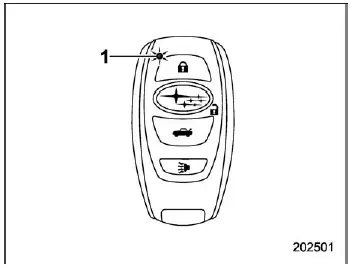
- LED indicator
2. Confirm that the LED indicator flashes four times, indicating that power-saving mode has been successfully activated.
While in this mode, the Subaru Ascent keyless access and push-button start functions will be temporarily unavailable.
To exit power-saving mode, simply press any button on the Subaru Ascent access key fob.
Using these Subaru Ascent advanced access and power-saving features ensures better battery efficiency, enhanced security, and reliable everyday operation of your vehicle.
 Unlock using PIN Code Access
In the Subaru Ascent, when all doors including the rear gate are securely locked,
it is possible to unlock the driver's door without using the key fob by utilizing
the convenient PIN Code Acce ...
 Disabling keyless access function
WARNING
If you use an implanted pacemaker or defibrillator, it is strongly recommended
to disable the Subaru Ascent keyless access function by following the procedure
described in the section &qu ...
Other materials:
Read diagnostic trouble code (dtc) Operation
HVAC SYSTEM (AUTO A/C) (DIAGNOSTICS) > Read Diagnostic Trouble Code (DTC)OPERATION1. On «Start» display, select «Diagnosis».2. On «Vehicle selection» display, input the target vehicle information and select «Confirmed».3. On «Main Menu» display, select «Each System».4. On «Select Sys ...
How to select items on the screen
ON/OFF setting
Example
Within the Subaru Ascent interface, settings can be easily enabled or disabled
by touching the corresponding option and selecting ON
or OFF
.
This intuitive toggle system allows for quick adjustments without navigating through
complex menus.
Selecting
Ex ...
Inspection
INSTRUMENTATION/DRIVER INFO > Multi-function Display (MFD)INSPECTION1. MULTI-FUNCTION DISPLAY SWITCH1. Measure the resistance between connector terminals.Preparation tool:Circuit testerTerminal No.Inspection conditionsStandard2 — 3 (UP)ENTER (DOWN)All OFF1 M? or more (UP)ONLess than 1 ?ENTERONA ...
