
Subaru Crosstrek Service Manual: Inspection
INSTRUMENTATION/DRIVER INFO > Multi-function Display (MFD)
INSPECTION
1. MULTI-FUNCTION DISPLAY SWITCH
1. Measure the resistance between connector terminals.
Preparation tool:
Circuit tester
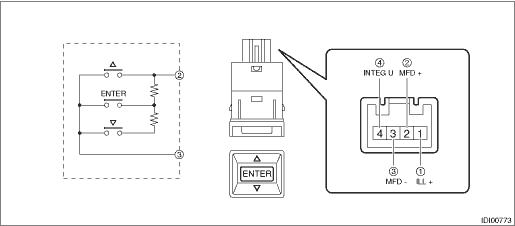
Terminal No. | Inspection conditions | Standard | |
2 — 3 |
ENTER
| All OFF | 1 M? or more |
| ON | Less than 1 ? | |
ENTER | ON | Approx. 1,000 ? | |
| ON | Approx. 3,670 ? | |
 (UP)
(UP) (DOWN)
2. Apply battery voltage between the connector terminals to check lighting condition of illumination inside the switch.
Terminal No. | Inspection conditions | Specification |
4 (+) — 1 (−) | Apply battery voltage. | Light ON |
3. If the inspection result is not within the standard, replace the switch - multi-function display.

 Removal
INSTRUMENTATION/DRIVER INFO > Multi-function Display (MFD)REMOVAL1. MULTI FUNCTION DISPLAY1. Disconnect the ground cable from battery. NOTE">2. Remove the center grille assembly. Air Vent ...
Other materials:
Seatbelt warning light and chime
Your
vehicle is equipped with a seatbelt
warning device at the driver's and front
passenger's seat, as required by current
safety standards.
With the ignition switch turned to the "ON"
position, this device reminds the driver
and front passenger to fasten their seatbelts
by illuminating ...
Note
WHEEL AND TIRE SYSTEM > Temporary TireNOTE“T-type” or “Temporary” tire for temporary use is equipped as a temporary tire.CAUTION:• The “T-type” or “Temporary” tire is only for temporary use. Replace with a conventional tire as soon as possible ...
Dtc b19f3 short in front p/t 2 rh (to +b)
AIRBAG SYSTEM (DIAGNOSTICS) > Diagnostic Chart with Trouble CodeDTC B19F3 SHORT IN FRONT P/T 2 RH (TO +B)Diagnosis start condition:Ignition voltage is 10 V to 16 V.DTC detecting condition:• Lap seat belt pretensioner (RH) circuit is shorted to power supply.• Lap seat belt pretensioner ...
