
Subaru Crosstrek Service Manual: Removal
INSTRUMENTATION/DRIVER INFO > Multi-function Display (MFD)
REMOVAL
1. MULTI FUNCTION DISPLAY
1. Disconnect the ground cable from battery. NOTE">
2. Remove the center grille assembly. Air Vent Grille > REMOVAL">
3. Release the claw and hook, and then remove the cover center UPR.
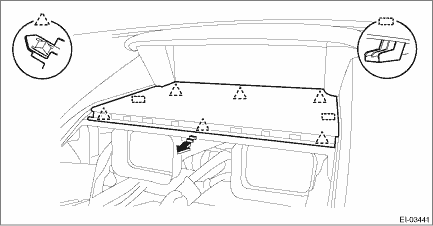
NOTE:
Lightly push up the back of the cover center UPR, hook the finger to the end portion and pull it toward you to remove it.
4. Remove the multi-function display.
CAUTION:
Be careful not to damage the multi-function display or instrument panel.
(1) Release the screws and claws.
(2) Pull the multi-function display assembly toward you, and disconnect the connector.
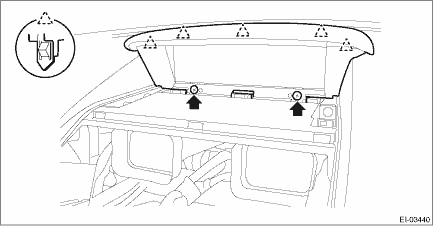
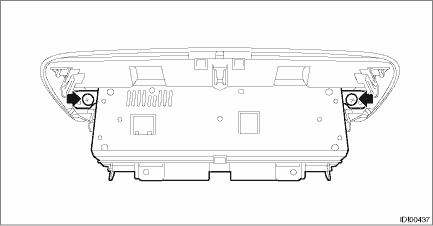
(3) Remove the screw, and remove the multi-function display from the panel - display.
2. MULTI-FUNCTION DISPLAY SWITCH
1. Disconnect the ground cable from battery. NOTE">
2. Remove the center grille assembly. Air Vent Grille > REMOVAL">
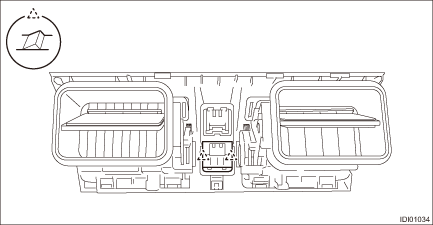
3. Release the claws and remove the switch - multi-function display.
 Inspection
INSTRUMENTATION/DRIVER INFO > Multi-function Display (MFD)INSPECTION1. MULTI-FUNCTION DISPLAY SWITCH1. Measure the resistance between connector terminals.Preparation tool:Circuit testerTerminal No. ...
 Installation
INSTRUMENTATION/DRIVER INFO > Multi-function Display (MFD)INSTALLATIONCAUTION:• Make sure the electrical connector is connected securely.• Make sure that the multi-function display (MFD ...
Other materials:
Dtc c0056 g sensor signal
VEHICLE DYNAMICS CONTROL (VDC) (DIAGNOSTICS) > Diagnostic Procedure with Diagnostic Trouble Code (DTC)DTC C0056 G SENSOR SIGNALDTC detecting condition:Longitudinal G sensor signal failureTrouble symptom:• ABS does not operate.• VDC does not operate.• EyeSight does not operate.ST ...
Dtc p1492 coil 1 egr "a" control circuit low
ENGINE (DIAGNOSTICS)(H4DO) > Diagnostic Procedure with Diagnostic Trouble Code (DTC)DTC P1492 COIL 1 EGR "A" CONTROL CIRCUIT LOWNOTE:For the diagnostic procedure, refer to DTC P1498. Diagnostic Procedure with Diagnostic Trouble Code (DTC) > DTC P1498 COIL 4 EGR "A" CONTROL ...
Removal
FRONT SUSPENSION > Front StrutREMOVAL1. Lift up the vehicle, and then remove the front wheels.2. Remove the front strut assembly.(1) Place an alignment mark (a) on the adjusting bolt and the strut.(2) Remove the brake hose bracket.(3) Remove the clamp of ABS wheel speed sensor harness.(4) Remove ...
