
Subaru Crosstrek Owners Manual: Using the phone switch/microphone
- Steering switch
By pressing the steering switch, a call can be received or ended without taking your hands off the steering wheel.
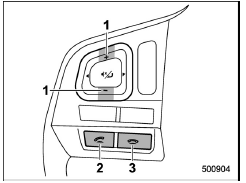
- Volume control switch
- Off hook switch
- On hook switch
- Microphone
The microphone is used when talking on the phone.
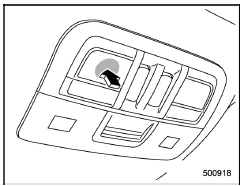
Type A
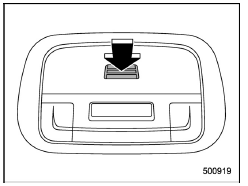
Type B
How to change the hands-free phone system
The phone (menu) screen can be used to make a phone call. To display the handsfree operation screen, press the HOME button and then select the "PHONE" key, or press the off hook switch on the steering wheel.
 Registering/connecting a Bluetooth phone
To use the hands-free system for cell
phones, it is necessary to register a cell
phone with the system. Refer to "Registering/
connecting Bluetoothdevice"
Bluetooth phone condition display
The co ...
 Making a call
There are several methods by which a call
can be made, as described below.
1. Press the HOME button on the audio
panel.
2. Touch the "PHONE" key.
3. Select the desired key to make a call
f ...
Other materials:
Preparation tool
CRUISE CONTROL SYSTEM (DIAGNOSTICS) > General DescriptionPREPARATION TOOL1. SPECIAL TOOLILLUSTRATIONTOOL NUMBERDESCRIPTIONREMARKS — SUBARU SELECT MONITOR 4Used for setting of each function and troubleshooting for electrical system.NOTE:For detailed operation procedures of Subaru Select Monitor ...
Installation
AIRBAG SYSTEM > Side Airbag SensorINSTALLATIONCAUTION:Do not reuse the bolt and nut.Always replace with the specified new bolts and nuts.1. Before installation, inspect the following items and replace any faulty part with a new part.• The side airbag sensor, sensor bracket, or connector are ...
Installation
CONTROL SYSTEMS > MT Gear Shift LeverINSTALLATION1. Insert the gear shift lever from the room side.NOTE:Insert the rod and the stay, and then temporarily set them onto the transmission mount.2. Lift up the vehicle.3. Install the joint to the transmission and secure with a spring pin.(A)Joint(B)Sp ...
