
Subaru Ascent 2018-2026 Owner's Manual: Using the Driver Monitoring System
User recognition
When a driver profile is registered, the Subaru Ascent utilizes facial recognition technology to automatically identify the driver and apply personalized settings.
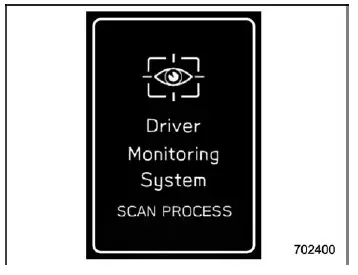
1. When the driver's door is opened while the push-button ignition switch is OFF, the user recognition interface is activated and the Subaru Ascent begins scanning for a registered user.
In some situations, such as when only a short time has passed since the ignition was turned off, the recognition screen may not appear immediately. However, the Subaru Ascent will still initiate recognition once the door is closed.
2. Sit properly in the driver’s seat and face forward for a few seconds to allow accurate recognition.
3. Once the Subaru Ascent successfully identifies the user, a welcome screen is displayed on the combination meter (color LCD).
At this moment, multiple personalized settings—including seat position, mirror angles, climate preferences, and display configurations—are automatically restored according to the stored user profile.
NOTE
- Operating the center information display controls will close the recognition screen, but recognition continues in the background.
- If the select lever is not in the "P" position, seat adjustment will not be executed even after recognition is completed.
- If recognition fails, repeat the process following the instructions in "When a user is not recognized".
- The Subaru Ascent does not perform user recognition while the vehicle is in motion.
- If the seat or mirrors are already moving during recognition, automatic retrieval of their positions may not occur.
- If any manual adjustment is made during the retrieval process, the system
will cancel the automatic positioning. This includes:
- Operating seat adjustment switches
- Adjusting mirror controls
- Pressing memory buttons ("SET", "1", or "2")
- Moving the select lever out of the "P" position
When a user is not recognized
In certain situations, the Subaru Ascent may not be able to identify the driver, and a message such as "User recognition stopped" may appear.
- An object may be blocking the camera
Ensure that the camera has a clear view, then repeat the recognition process as described in the Driver Monitoring System section.
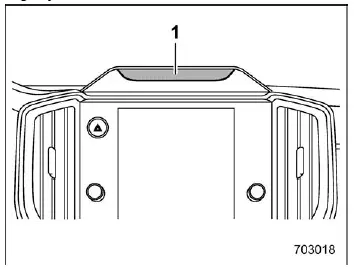
- Camera
NOTE
- User recognition accuracy in the Subaru Ascent may decrease if the camera lens is dirty or covered with fingerprints. Clean the surface gently using a soft or slightly damp cloth.
- If the synchronized user function is turned OFF, it may not be possible to manually repeat the facial recognition process.
Additional insight: The Subaru Ascent Driver Monitoring System is designed to combine advanced safety monitoring with intelligent personalization. By maintaining a clean camera area and ensuring proper seating position, drivers can achieve the most reliable recognition performance and fully benefit from the system’s capabilities.
 Driver Monitoring System indicator/warning
Driver Monitoring System operation indicator light (green)
Driver Monitoring System OFF indicator light
Driver Monitoring System temporary stop indicator light
Driver Monitoring System wa ...
 Registering and deleting a user
Within the Subaru Ascent Driver Monitoring System, multiple users can be registered
to enable personalized recognition and convenience features. Registered profiles
can also be removed when no lon ...
Other materials:
How to use the rear view camera
When the shift lever/select lever is set to
"R", the rear view camera automatically
displays the rear view image from the
vehicle. When the lever is set to other
positions, the image before setting to "R"
is displayed.
1. Set the ignition switch to "ON".
2. Set the shift lever/select leve ...
Date and time settings
The items in the date and time settings
can be set. To change the items, operate
the "
" or "
" switch.
NOTE
The "Time/Date" item must be set to
display the "Birthday", "Anniversary"
and notifications for vehicle maintenance.
The "Birthday" and "Anniversary"
items can be entered ...
Fastening the seatbelt
Front seatbelts
1. Adjust the seating position in the Subaru Ascent according to the following
guidelines.
Driver's seat: Set the seatback to an upright position and move the seat as far
back from the steering wheel as possible while maintaining full control of the vehicle.
Front passenge ...
