
Subaru Ascent 2018-2026 Owner's Manual: Sonar Audible Alarm function
In the Subaru Ascent, the Reverse Automatic Braking (RAB) system is supported by an advanced sonar audible alert function designed to enhance driver awareness. When the system detects a potential obstacle while reversing, it emits warning sounds in three distinct intensity levels, helping the driver better judge distance and react promptly to avoid a collision. This layered warning approach improves safety and precision when maneuvering the Subaru Ascent in tight spaces.
NOTE
There may be a slight delay between the moment an object is detected and when the visual indication and audible alerts are activated. This delay depends on environmental conditions and sensor response timing in the Subaru Ascent.
Guideline of detecting range
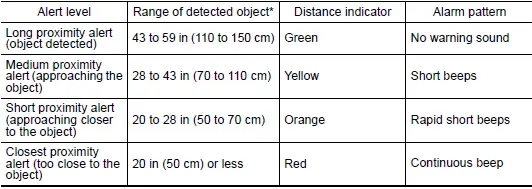
*: The actual detection range may vary depending on weather, surrounding objects, and surface conditions affecting the Subaru Ascent sensors.
Obstacle detected and alert level
When an object is identified behind the Subaru Ascent, the system displays the detection range both on the center information display and on the color LCD of the combination meter. This visual feedback works together with audible alerts to give a clear understanding of proximity.
Depending on vehicle speed and proximity to the obstacle, the system will issue warning beeps and may automatically apply engine torque control for deceleration or activate automatic braking to reduce collision risk.
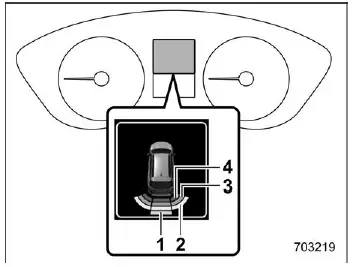
Combination meter display (color LCD)
- Long proximity alert (green)
- Medium proximity alert (yellow)
- Short proximity alert (orange)
- Closest proximity alert (red)
The Subaru Ascent communicates proximity levels clearly through color-coded indicators displayed in the system interface, allowing the driver to instantly recognize the level of danger.
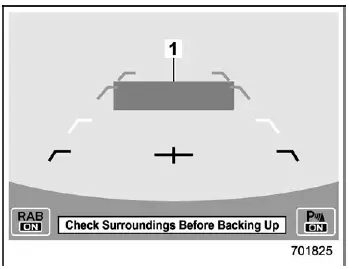
Long proximity alert (object detected)
- Green: 43 to 59 in (110 to 150 cm)
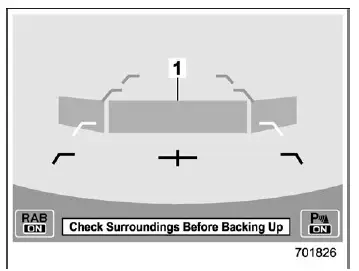
Medium proximity alert (approaching the object)
- Yellow: 28 to 43 in (70 to 110 cm)
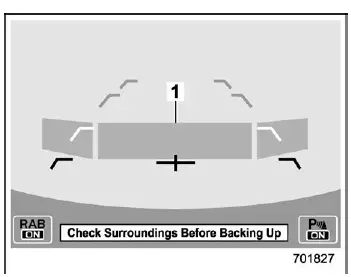
Short proximity alert (approaching the object closer)
- Orange: 20 to 28 in (50 to 70 cm)
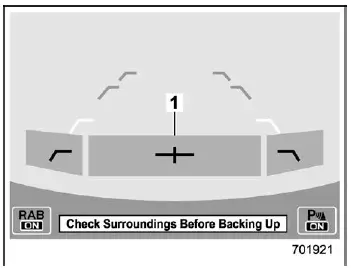
Closest proximity alert (too close to the object)
- Red: 20 in (50 cm) or less
 Operating conditions
The Reverse Automatic Braking (RAB) system in the Subaru Ascent is engineered
to function only when a specific set of operating conditions is satisfied. These
requirements ensure that the system d ...
 Automatic Braking function operation
Object close behind warning
Automatic braking warning
Warning message
When the Subaru Ascent determines that there is a high probability of collision
while reversing, the system escalate ...
Other materials:
Operation
AIRBAG SYSTEM (DIAGNOSTICS) > Read Current DataOPERATIONCheck the operating condition of each sensor in the event of malfunction in the seat belt buckle switch, or when the seat belt buckle switch has been replaced.1. On «Start» display, select «Diagnosis».2. On «Vehicle selection» display, ...
Note
ENTERTAINMENT > Audio SystemNOTEFor procedure of each component in the audio system, refer to the respective sections.• Audio unit: Audio">• Front speaker– Tweeter (instrument panel): Front Speaker > REMOVAL">– Door speaker: Front Speaker > REMOVAL" ...
By incoming calls
On the phone (menu) screen, select the
"Incoming Calls" key to open the "Incoming
Calls" screen.
You can make a call by selecting an item
in the incoming call history list.
If there is no incoming call history, a
message appears to indicate that there
is no incoming call history data.
...
