
Subaru Ascent 2018-2026 Owner's Manual: Automatic Braking function operation
Object close behind warning
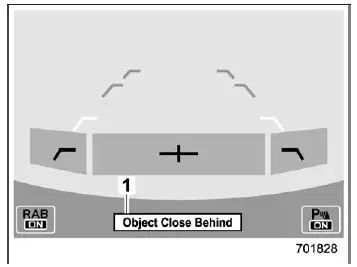
Automatic braking warning
- Warning message
When the Subaru Ascent determines that there is a high probability of collision while reversing, the system escalates its response. Audible alerts may intensify into continuous warning tones, and the system will automatically intervene by applying braking force or reducing engine output to help prevent impact.
Simultaneously, a warning message is displayed on the combination meter (color LCD), ensuring the driver receives both visual and audible cues.
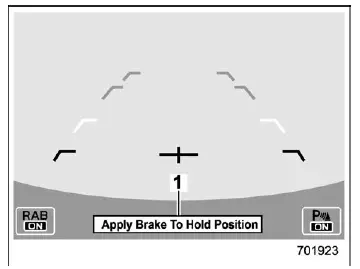
Depress brake pedal warning
- Warning message
After the Subaru Ascent has been brought to a stop by automatic braking, the driver must press the brake pedal to maintain control. Until the brake pedal is pressed, the system will continue to display a warning message and emit a continuous alert tone.
This ensures the driver remains actively engaged and aware of the situation.
NOTE
The Sonar Audible Alarm and Automatic Braking systems in the Subaru Ascent operate under different conditions. In certain situations, only one of these systems may activate, depending on sensor input and driving circumstances.
WARNING
Always press the brake pedal immediately after the vehicle has been stopped by the automatic braking system. Depending on road surface conditions, tire grip, or slope, the vehicle may not remain fully stationary, which could result in an accident.
After the vehicle is stopped by the system
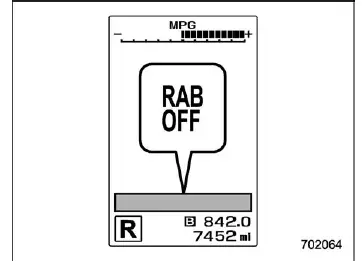
Once the brake pedal is applied, the RAB OFF indicator will illuminate, and the Reverse Automatic Braking system will temporarily deactivate.
The system will automatically reset and become active again the next time the Subaru Ascent is shifted into the "R" (Reverse) position.
NOTE
- In certain conditions, after the Subaru Ascent has been stopped by the
Reverse Automatic Braking system, the system may release brake control and automatically
engage the electronic parking brake. This may occur:
- After approximately 2 minutes of inactivity
- If any door is opened
- The Reverse Automatic Braking (RAB) system may temporarily stop functioning,
and the RAB OFF indicator will illuminate under the following conditions:
- Accumulation of snow, ice, or dirt on sonar sensors or the rear bumper
- Objects located extremely close to the rear bumper when shifting into reverse
- Interference from sounds with similar frequencies to sonar signals
- Vehicle Dynamics Control system is turned OFF
Canceling the Reverse Automatic Braking (RAB) system operation
The Reverse Automatic Braking system in the Subaru Ascent can be manually overridden when necessary by performing any of the following actions.
- Press the brake pedal while the system has stopped the vehicle
- Press the accelerator pedal while the system has stopped the vehicle
- Hold the accelerator pedal continuously to override limited acceleration and continue reversing
- Shift the select lever out of the "R" position
NOTE
The system will automatically cancel its operation once the detected object is no longer within the sensor range.
Additional tip: In real-world driving with the Subaru Ascent, always combine electronic assistance systems like RAB with direct visual checks using mirrors and rearview cameras to ensure maximum safety, especially in complex parking environments.
 Sonar Audible Alarm function
In the Subaru Ascent, the Reverse Automatic Braking (RAB) system is supported
by an advanced sonar audible alert function designed to enhance driver awareness.
When the system detects a potential ...
 Reverse Automatic Braking (RAB) system ON/OFF setting
In the Subaru Ascent, when the select lever is moved into the "R" (Reverse) position,
you gain access to customizable settings for the Reverse Automatic Braking (RAB)
system directly thr ...
Other materials:
Tire care - maintenance and safety practices
For reliable performance of your Subaru Ascent, inspect the tires ежедневно
or before each drive to ensure they are free from serious damage, embedded objects
such as nails or stones, and any visible defects. At the same time, carefully
examine the tread pattern for signs of une ...
Beep volume setting
1. Perform the preparation steps according
to "Preparation for image quality and
volume settings"
2. Operate the "
" or "
" switch to
select the "Beep" item. Then push the
button.
3. Push the
button.
4. Select an item by operating the " " or
" " switch. Then pus ...
Removal
FRONT SUSPENSION > Front ArmREMOVAL1. Lift up the vehicle, and then remove the front wheels.2. Remove the under cover - front. Front Under Cover > REMOVAL">3. Remove the front arm assembly.(1) Remove the bolt, and then detach the front support. (Electric power steering model only)(2) ...
