
Subaru Crosstrek Owners Manual: Selecting an audio source
1. Press the AUDIO/TUNE knob.

2. Select the desired source.
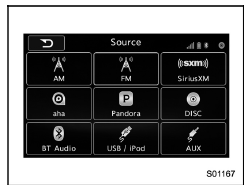
Example: Source select screen
NOTE
- If the audio control screen appears, select the "Source" key on the audio screen or press the AUDIO/TUNE knob again.
- When you push the AUDIO/TUNE knob while any screen other than the audio control screen is displayed, the display will return to the audio control screen.
- When the AUDIO/TUNE knob is pushed and held, the graphic equalizer screen will be displayed. Refer to ""Graphic Equalizer""
 Turning the system on and off
Press the power/VOLUME knob to turn
the audio/visual system on and off. When
the system turns on, the mode that was in
use the last time the system was turned off
will be displayed. Press and ...
 Selecting a function menu
Press the HOME button to display home
screen.
Item
Function
AUDIO
Select to display the main
screen of the audio source that
was selected previously.
PHONE
...
Other materials:
Removal
MECHANICAL(H4DO) > Cam SprocketREMOVAL1. CAM SPROCKET RHNOTE:When replacing a single part, perform the work with the engine assembly installed to body.• Intake cam sprocket RH1. Remove the chain cover. Chain Cover > REMOVAL">2. Remove the timing chain RH. Timing Chain Assembly ...
Dtc c0074 master cylinder pressure sensor output
VEHICLE DYNAMICS CONTROL (VDC) (DIAGNOSTICS) > Diagnostic Procedure with Diagnostic Trouble Code (DTC)DTC C0074 MASTER CYLINDER PRESSURE SENSOR OUTPUTDTC detecting condition:Defective pressure sensorTrouble symptom:• ABS does not operate.• VDC does not operate.• EyeSight does no ...
Dtc b1761 occupant detection sensor mat liquid coating
AIRBAG SYSTEM (DIAGNOSTICS) > Diagnostic Chart with Trouble CodeDTC B1761 OCCUPANT DETECTION SENSOR MAT LIQUID COATINGNOTE:Refer to “Occupant Detection System” for details on DTC B1761. Diagnostic Procedure with Diagnostic Trouble Code (DTC) > DTC B1761 OCCUPANT DETECTION SENSOR M ...
