
Subaru Crosstrek Owners Manual: Selecting a channel from the list
1. The categories list is displayed via either of the following procedures.
- When you touch the
 tab in the
SiriusXM main screen (if the list that
was displayed the last time is Categories).
tab in the
SiriusXM main screen (if the list that
was displayed the last time is Categories). - When you select the
 tab in
each
list screen.
tab in
each
list screen.
2. Each channel list is displayed when you select each category item.
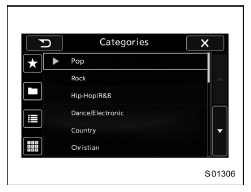
In addition, the following messages appear.
| Display Message | Contents |
| "Subscription Update" "Press OK to Continue" | An update to your SiriusXM subscription has been received by the SiriusXM tuner. Touch any key to continue. |
| "Channel XXX Not Available" ("XXX" refers to the selected channel number.) | This channel is not a valid SiriusXM channel.
The channel number has been entered incorrectly, or the channel was removed from the SiriusXM channel lineup. |
| "Channel XXX Not Subscribed Call." "Call SiriusXM to Subscribed." ("XXX" refers to the selected channel number.) | This channel is not included in your SiriusXM subscription plan. |
| "Ch Locked" "Lock Code?" | The selected channel has been locked by the
parental controls.
A prompt to enter the unlock code will appear. |
| "Check Antenna" | Ensure the SiriusXM antenna cable is connected
to the SiriusXM tuner correctly.
Check the SiriusXM antenna wire for breaks or sharp bends. Replace the antenna if necessary. |
| "No Signal" | The vehicle must be outside, and the antenna must have a clear view of the southern sky. |
NOTE
Contact SiriusXM
- Listener Care Center (U.S. customers): 1-866-635-2349
- Listener Care Centre (Canadian customers): 1-877-209-0079
 Presetting a channel
1. The presets list is displayed via either
of the following procedures.
When you touch the tab in the
SiriusXM main screen (if the list that
was displayed the last time is Presets).
When y ...
 Direct Tune
1. A channel input screen is displayed
when you touch the tab.
2. Input any number and touch the "OK"
key, receive the channel which input.
...
Other materials:
Dtc b2a0d airbag signal
TELEMATICS SYSTEM (DIAGNOSTICS) > Diagnostic Procedure with Diagnostic Trouble Code (DTC)DTC B2A0D AIRBAG SIGNALDiagnosis start condition:When ignition switch is ON.DTC detecting condition:Either the regular signal or collision signal cannot be detected from the airbag CM for at least 30 seconds. ...
Dtc p2007 tgv control stuck closed bank 2
ENGINE (DIAGNOSTICS)(H4DO) > Diagnostic Procedure with Diagnostic Trouble Code (DTC)DTC P2007 TGV CONTROL STUCK CLOSED BANK 2DTC DETECTING CONDITION:Immediately at fault recognitionCAUTION:After servicing or replacing faulty parts, perform Clear Memory Mode Clear Memory Mode > OPERATION" ...
Inspection
BODY CONTROL SYSTEM (DIAGNOSTICS) > General DescriptionINSPECTIONBefore performing diagnosis, check the following items which might affect body control system problems.1. Check the battery. Battery">2. Check the fuse condition.Make sure that ampere of the fuse is setting value, and it is ...
