
Subaru Crosstrek Service Manual: Removal
SECURITY AND LOCKS > Steering Lock CM
REMOVAL
CAUTION:
• Before handling the airbag system components, refer to “CAUTION” of “General Description” in “AIRBAG SYSTEM”. General Description > CAUTION">
• Do not allow harness and connectors to interfere or get tangled up with other parts.
• If the steering wheel and steering angle sensor (steering roll connector) are removed, perform “VSC(VDC) Centering Mode” of the VDC. VDC Control Module and Hydraulic Control Unit (VDCCM&H/U) > ADJUSTMENT">
1. Disconnect the ground cable from battery and wait for at least 60 seconds before starting work. NOTE">
2. Remove the cover assembly - instrument panel LWR driver. Instrument Panel Lower Cover > REMOVAL">
3. Remove the knee airbag module. Knee Airbag Module > REMOVAL">
4. Remove the universal joint assembly - steering. Universal Joint > REMOVAL">
5. Remove the column assembly - steering. Steering Column > REMOVAL">
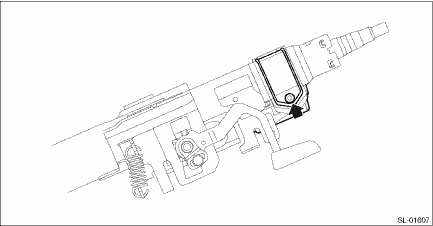
6. Remove the steering lock CM.
(1) Secure the column assembly - steering in a vise.
(2) Use the reverse tap or drill to remove the set bolt and remove the steering lock CM.
CAUTION:
Do not apply any impact to the set bolt by a chisel or punch.
 Inspection
SECURITY AND LOCKS > Steering Lock CMINSPECTION1. Check if the steering lock is released when you start the engine using the push button ignition switch.2. If the system does not operate normally a ...
 Installation
SECURITY AND LOCKS > Steering Lock CMINSTALLATIONCAUTION:• When the control module related to immobilizer has been replaced, be sure to perform the registration of immobilizer system. For det ...
Other materials:
Caution
LIGHTING SYSTEM > General DescriptionCAUTION• Before disassembling or reassembling parts, always disconnect the battery ground cable from battery. When replacing the audio, control module and other parts provided with memory functions, record the memory contents before disconnecting the bat ...
Installation
LIGHTING SYSTEM > Headlight AssemblyINSTALLATIONCAUTION:Install so that the front end of the under cover (b) comes inside the bumper face - front (a), and the front end of the mud guard (c) comes outside the bumper face - front (a).1. Install each part in the reverse order of removal.Tightening t ...
Replacement of brake pad and lining
The disc brakes have audible wear
indicators on the brake pads. If the brake
pads wear close to their service limit, the
wear indicator makes a very audible
scraping noise when the brake pedal is
applied.
If you hear this scraping noise each time
you apply the brake pedal, have the brak ...
