
Subaru Crosstrek Service Manual: Removal
MECHANICAL(H4DO) > V-belt
REMOVAL
NOTE:
When replacing a single part, perform the work with the engine assembly installed to body.
1. V-BELT
1. When working on the vehicle
NOTE:
When working on the vehicle, perform the following steps also.
(1) Remove the V-belt covers.
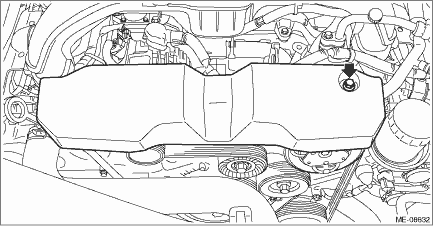
(2) Remove the air intake duct. Air Intake Duct > REMOVAL">
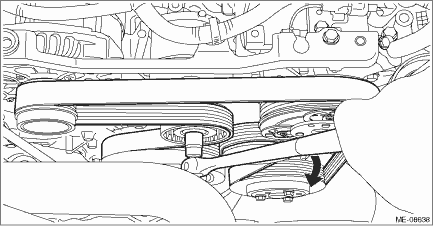
2. Attach the tool to the V-belt tensioner assembly, and rotate the tool clockwise to loosen and remove the V-belt.
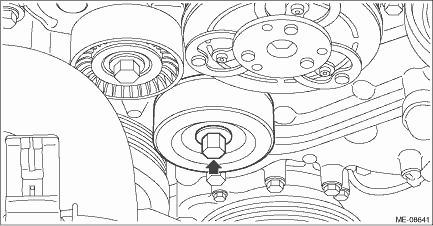
2. V-BELT TENSIONER ASSEMBLY AND IDLER PULLEY
1. Remove the V-belts.
2. Remove the cap from V-belt tensioner assembly.
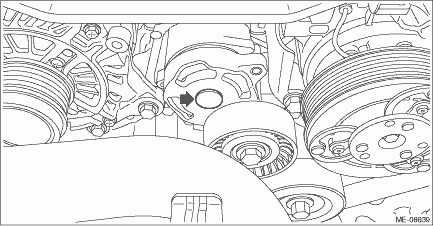
3. Remove the bolt securing the V-belt tensioner assembly to the generator bracket, and remove the V-belt tensioner assembly.
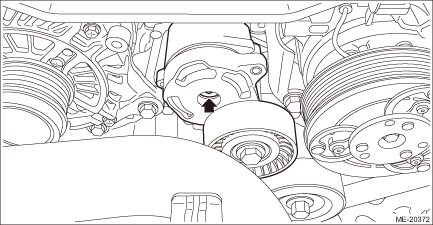
4. Remove the bolts which secure the idler pulley to the chain cover, and remove the idler pulley.
 Inspection
MECHANICAL(H4DO) > V-beltINSPECTION1. Check the V-belt for cracks, tear or wear.2. Check the V-belt tensioner assembly and idler pulley for deformation, cracks or other damages.3. Check that the V- ...
 Installation
MECHANICAL(H4DO) > V-beltINSTALLATION1. V-BELTInstall in the reverse order of removal.CAUTION:• When reusing the V-belt, wipe off dust and water with cloth.• Do not use the V-belt if th ...
Other materials:
Note
GLASS/WINDOWS/MIRRORS > Remote Control Mirror SystemNOTEFor procedure of each component in the remote control mirror system, refer to the respective section.• Outer mirror assembly: Outer Mirror Assembly">• Remote control mirror switch: Remote Control Mirror Switch"> ...
Installation
AIRBAG SYSTEM > Curtain Airbag ModuleINSTALLATIONCAUTION:• Before handling the airbag system components, refer to “CAUTION” of “General Description” in “AIRBAG SYSTEM”. General Description > CAUTION">• When installing the curtain airbag ...
Basic diagnostic procedure Procedure
INSTRUMENTATION/DRIVER INFO (DIAGNOSTICS) > Basic Diagnostic ProcedurePROCEDURE1. COMBINATION METERSTEPCHECKYESNO1.PERFORM CUSTOMER INTERVIEW.Using the Check List for Interview, ask the customer the condition of how trouble occurs. Check List for Interview > CHECK">Did you interview t ...
