
Subaru Crosstrek Service Manual: Removal
LIGHTING SYSTEM > High-mounted Stop Light
REMOVAL
1. CROSSTREK MODEL
1. Disconnect the ground cable from battery. NOTE">
2. Remove the trim panel - rear gate UPR. Rear Gate Trim > REMOVAL">
3. Remove the light assembly - high-mounted.
(1) Remove the nut.
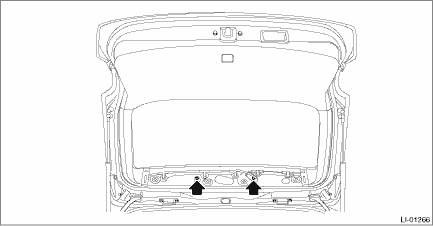
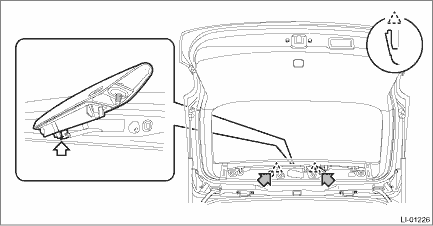
(2) From the inside of the rear gate, push the claws on both side of the light assembly - high-mounted to take it out toward vehicle rear.
(3) Disconnect the connector and remove the light assembly - high-mounted.
 Inspection
LIGHTING SYSTEM > High-mounted Stop LightINSPECTION1. Install the light to test if it illuminates normally.2. If it fails to illuminate normally, replace the light assembly - high-mounted with a ne ...
 Installation
LIGHTING SYSTEM > High-mounted Stop LightINSTALLATIONInstall each part in the reverse order of removal.Tightening torque:Light assembly - high-mounted: 4.5 N·m (0.46 kgf-m, 3.3 ft-lb) ...
Other materials:
Removal
SUNROOF/T-TOP/CONVERTIBLE TOP (SUNROOF) > Sunroof SwitchREMOVAL1. Disconnect the ground cable from battery. NOTE">2. Remove the light assembly - map. (Models without EyeSight) Spot Map Light > REMOVAL">3. Remove the stereo camera cover assembly. (Models with EyeSight) Stereo ...
Dtc u0122 lost communication with vehicle dynamics control module
TELEMATICS SYSTEM (DIAGNOSTICS) > Diagnostic Procedure with Diagnostic Trouble Code (DTC)DTC U0122 LOST COMMUNICATION WITH VEHICLE DYNAMICS CONTROL MODULEDetected when CAN data from VDC does not arrive.NOTE:Perform the diagnosis for LAN system. Basic Diagnostic Procedure > PROCEDURE"> ...
Clear memory mode Operation
IMMOBILIZER (DIAGNOSTICS) > Clear Memory ModeOPERATIONNOTE:For detailed operation procedures, refer to “Application help”.1. ECM1. On «Start» display, select «Diagnosis».2. On «Vehicle selection» display, input the target vehicle information and select «Confirmed».3. On «Main ...
