
Subaru Crosstrek Owners Manual: Profiles
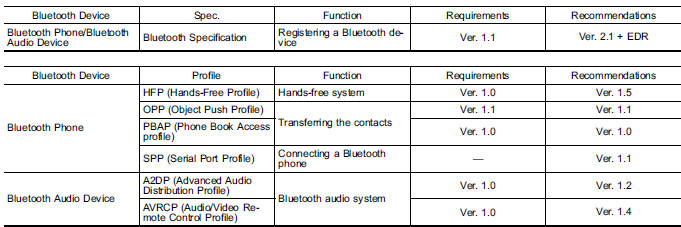
This system supports the following services.
NOTE
- If your cell phone does not support HFP, registering the Bluetooth phone or using OPP, PBAP, or SPP profiles individually will not be possible.
- If the connected Bluetooth device version is older than recommended or incompatible, the Bluetooth device function may not work properly.
- For USA customers, please visit www.subaru.com for details. Outside of the USA customers, contact your local dealer to arrange a demonstration in order to confirm whether or not the device can be paired with the vehicle.
 Registering a Bluetooth Audio device for the first time
To use the Bluetooth Audio, it is necessary
to register an audio device with the
system.
The device registration procedure is the
same for both the hands-free system and Bluetooth audio.
1. Dis ...

Other materials:
Dtc b1430 in-vehicle (post evaporator) temperature sensor circuit open
HVAC SYSTEM (AUTO A/C) (DIAGNOSTICS) > Diagnostic Procedure with Diagnostic Trouble Code (DTC)DTC B1430 IN-VEHICLE (POST EVAPORATOR) TEMPERATURE SENSOR CIRCUIT OPENDTC detecting condition:In-vehicle sensor circuit is open.Trouble symptom:In-vehicle air temperature is falsely recognized as 25& ...
Inspection
AUTO HEADLIGHT BEAM LEVELER SYSTEM (DIAGNOSTICS) > General DescriptionINSPECTION1. BASIC INSPECTIONBefore performing the diagnosis, check the following items which may cause problems relating the wiper or light.1. Check the battery. Battery">2. Check the relay and fuse condition. Relay ...
Caution
EMISSION CONTROL (AUX. EMISSION CONTROL DEVICES)(H4DO) > General DescriptionCAUTION• Prior to starting work, pay special attention to the following:1. Always wear work clothes, a work cap, and protective shoes. Additionally, wear a helmet, protective goggles, etc. if necessary.2. Protect th ...
