
Subaru Crosstrek Service Manual: Removal
GLASS/WINDOWS/MIRRORS > Power Window Control Switch
REMOVAL
1. MAIN SWITCH
1. Disconnect the ground cable from battery and wait for at least 60 seconds before starting work. NOTE">
2. Remove the trim panel - front door. Door Trim > REMOVAL">
3. Remove the panel - power window main switch.
CAUTION:
Be careful not to damage the trim panel - front door with the panel - power window main switch.
(1) Insert a sheet of protective paper (a) between panel - power window main switch and trim panel - front door.
(2) Remove the screws and disconnect the connector.
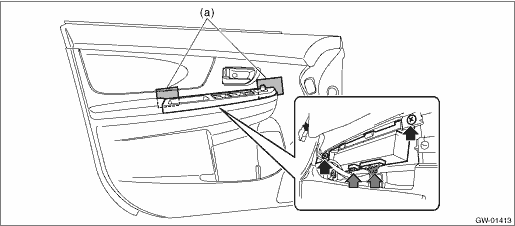
(3) Release the claws, and then remove the panel - power window main switch.
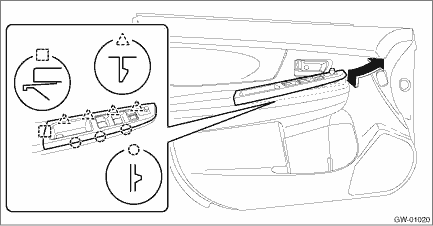
(4) Release the claws, and then remove the switch - power window main.
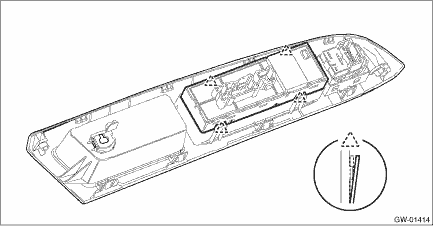
2. SUB-SWITCH
Switch - power window sub front
For removal of the switch - power window sub front on the passenger’s seat, refer to the removal procedure of the switch - power window main. Power Window Control Switch > REMOVAL">
Switch - power window sub rear
1. Disconnect the ground cable from battery and wait for at least 60 seconds before starting work. NOTE">
2. Remove the trim panel - rear door. Door Trim > REMOVAL">
3. Remove the panel - power window sub switch rear.
CAUTION:
Be careful not to damage the trim panel - rear door with the panel - power window sub switch rear.
(1) Insert a sheet of protective paper (a) between panel - power window sub switch rear and trim panel - rear door.
(2) Remove the screws and disconnect the connector.
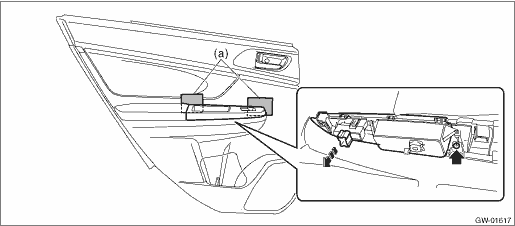
(3) Release the claws, and then remove the panel - power window sub switch rear.
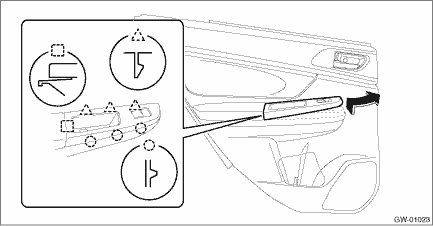
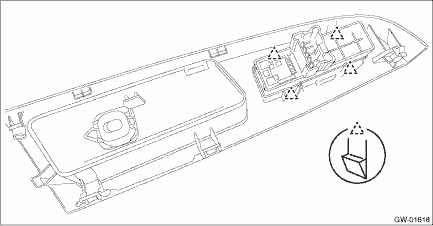
4. Release the claws, and then remove the switch - power window sub rear.
 Inspection
GLASS/WINDOWS/MIRRORS > Power Window Control SwitchINSPECTION1. MAIN SWITCH• Driver’s seatCAUTION:Since the switch - power window main is controlled by CPU, do not check continuity for ...
 Installation
GLASS/WINDOWS/MIRRORS > Power Window Control SwitchINSTALLATIONCAUTION:• After installing the switch - power window main, always perform the initial setting.Failure to do so may cause the imp ...
Other materials:
Installation
EXTERIOR/INTERIOR TRIM > Front GrilleINSTALLATIONCAUTION:• Install so that the front end of the under cover (b) comes inside the bumper face - front (a), and the front end of the mud guard (c) comes outside the bumper face - front (a).• Before installing the bumper face, match the cla ...
Seatbelt warning light and chime
The Subaru Ascent is equipped with an advanced seatbelt reminder system for both
the driver and front passenger seats, fully compliant with modern safety regulations
and designed to enhance occupant protection.
Driver's and front passenger's seats
When the ignition switch of the Subaru ...
Diagnostic procedure without diagnostic trouble code (dtc) Check shift indicator
CONTINUOUSLY VARIABLE TRANSMISSION (DIAGNOSTICS) > Diagnostic Procedure without Diagnostic Trouble Code (DTC)CHECK SHIFT INDICATORDiagnosis:• CAN communication is abnormal with the combination meter.• Combination meter malfunctionTrouble symptom:• Shift indicator does not displa ...
