
Subaru Crosstrek Service Manual: Removal
SEATS > Rear Seat
REMOVAL
CAUTION:
• Before handling the airbag system components, refer to “CAUTION” of “General Description” in “AIRBAG SYSTEM”. General Description > CAUTION">
• Airbag system satellite safing sensor is located in the lower of the rear seat cushion center. Be careful not to apply strong impact to the sensor when working with the rear seat cushion removed.
1. Disconnect the ground cable from battery and wait for at least 60 seconds before starting work. NOTE">
2. Remove the rear seat cushion assembly.
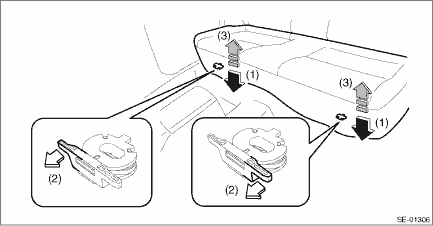
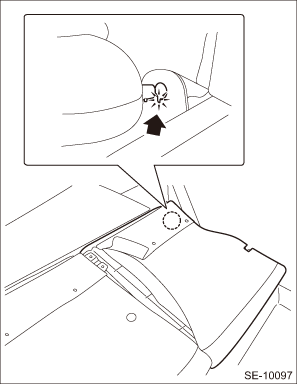
(1) Push the corners of the rear seat cushion from above.
(2) While pushing the corners of the rear seat cushion from above, pull the knob of the hook - seat cushion rear towards yourself.
(3) While pulling the knob towards yourself, disconnect the hooks by lifting up the rear seat cushion.
NOTE:
Pull the left side of the knob to disconnect the LH side hook, and pull the right side of the knob to disconnect the RH side hook.
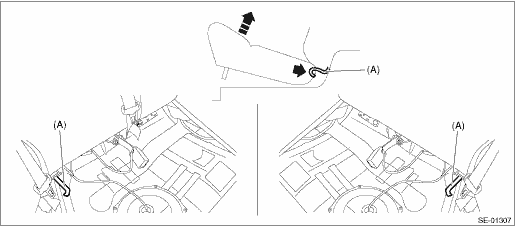
(4) Remove the hook (A) by pushing it back while lifting the front side of the rear seat cushion, and remove the rear seat cushion.
3. Remove the backrest assembly LH.
(1) Tilt the backrest assembly LH forward.
(2) Remove the clips located at the bottom of the cover COMPL - rear backrest LH and RH of the rear seat back.
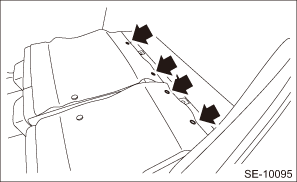
(3) Turn over the cover COMPL - rear backrest LH to remove the bolts.
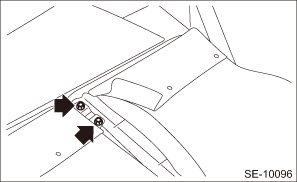
(4) Remove the backrest assembly LH from the hinge assembly.
NOTE:
The backrest assembly cannot be removed unless pin positions on the hinge assembly side and backrest assembly side are aligned.
4. Remove the backrest assembly RH.
(1) Remove the bolts and nuts.
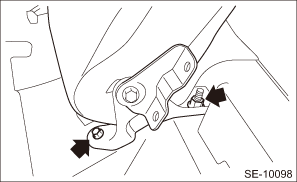
(2) Remove the backrest assembly RH from the hinge assembly.
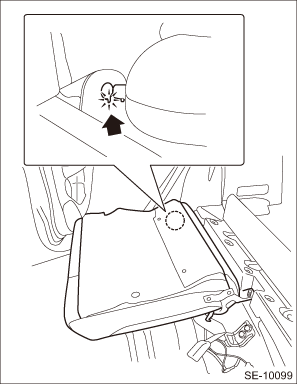
NOTE:
The backrest assembly cannot be removed unless pin positions on the hinge assembly side and backrest assembly side are aligned.
 Assembly
SEATS > Rear SeatASSEMBLYCAUTION:• Do not reuse hog rings.• Secure the hog ring using hog ring pliers.• Install the hog rings to the specified points securely and make sure that t ...
 Disassembly
SEATS > Rear SeatDISASSEMBLY1. Remove the rear seat. Rear Seat > REMOVAL">2. Remove the headrest assembly - rear backrest.3. Remove the armrest assembly - rear center. (model with armre ...
Other materials:
Ignition switch (models without "keyless access with push-button start
system")
WARNING
Never turn the ignition switch to
the "LOCK" position while the
vehicle is being driven or towed
because that will lock the steering
wheel, preventing steering
control. And when the engine is
turned off, it takes a much greater
effort than usual to steer.
Before leaving t ...
Preparation for maintenance settings
1. Turn the ignition switch to the "ON"
position.
2. Push and hold the
button to show
the selection screen.
3. After the selection screen is displayed,
operate the "
" or "
" switch to show the
"Maintenance" item. Then, push the
button. ...
Dtc p2420 evap system switching valve control circuit high
ENGINE (DIAGNOSTICS)(H4DO) > Diagnostic Procedure with Diagnostic Trouble Code (DTC)DTC P2420 EVAP SYSTEM SWITCHING VALVE CONTROL CIRCUIT HIGHDTC detecting condition:Immediately at fault recognitionCAUTION:After servicing or replacing faulty parts, perform Clear Memory Mode Clear Memory Mode > ...
