
Subaru Crosstrek Service Manual: Assembly
SEATS > Rear Seat
ASSEMBLY
CAUTION:
• Do not reuse hog rings.
• Secure the hog ring using hog ring pliers.
• Install the hog rings to the specified points securely and make sure that there is no wrinkle or twisting on the cover COMPL - rear backrest.
1. Assemble the cover COMPL - rear backrest and the cover - rear cushion in the same manner as for the front seat. Front Seat > ASSEMBLY">
2. Make sure that all hog rings (A) and wire clips (B) are attached securely.
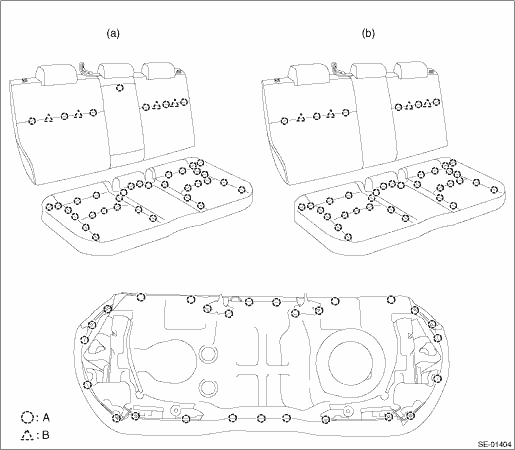
(a) | Model with armrest assembly - rear center | (b) | Model without armrest assembly - rear center |
3. Assemble each part in the reverse order of disassembly.
NOTE:
• Do not contaminate or damage the cover COMPL - rear backrest and the cover - rear cushion.
• While installing the hog rings, prevent the cover COMPL - rear backrest and the cover - rear cushion from getting wrinkled.
Tightening torque:
Refer to “COMPONENT” of “General Description”. General Description > COMPONENT">
4. Before installation, check the following items.
• No tear and fray on the cover COMPL - rear backrest and the cover - rear cushion.
• No fray or deformation on each wire cable.
5. Install each part in the reverse order of removal.
 Rear seat
...
 Removal
SEATS > Rear SeatREMOVALCAUTION:• Before handling the airbag system components, refer to “CAUTION” of “General Description” in “AIRBAG SYSTEM”. General De ...
Other materials:
Component
EXHAUST(H4DO) > General DescriptionCOMPONENT1. FRONT EXHAUST PIPE AND CENTER EXHAUST PIPE(1)Front exhaust pipe(12)Front exhaust pipe lower coverTightening torque: N·m (kgf-m, ft-lb)(2)Front catalytic converter(13)Front catalytic converter lower cover LHT1:13 (1.3, 9.6)(3)Center exhaust pip ...
Procedure
HVAC SYSTEM (HEATER, VENTILATOR AND A/C) > Compressor OilPROCEDURENOTE:Before making repairs, perform the oil return operation to return the compressor oil in circulation with the refrigerant to the compressor assembly.1. Increase the engine speed to 1,500 r/min.2. Turn the A/C switch to ON.3. Tu ...
Removal
FUEL INJECTION (FUEL SYSTEMS)(H4DO) > Rear Oxygen SensorREMOVAL1. Disconnect the ground cable from battery.2. Lift up the vehicle.3. Remove the under cover. Front Under Cover > REMOVAL">4. Disconnect the rear oxygen sensor connector.(A)Front oxygen (A/F) sensor connector(B)Rear oxygen ...
