
Subaru Crosstrek Service Manual: Removal
EXTERIOR/INTERIOR TRIM > Cowl Panel
REMOVAL
1. Open the front hood.
2. Remove the arm assembly - windshield wiper. Front Wiper Arm > REMOVAL">
3. Remove the cowl panel - side.
(1) Remove the clips.
(2) Release the claws, and then remove the cowl panel - side.
CAUTION:
Pulling with excessive force may damage the cowl panel - side. If it is difficult to remove, use a plastic remover or equivalent tool.

4. Remove the cowl panel assembly.
CAUTION:
Before removing the cowl panel, use an air blower and nylon brush to sweep gravel from the lower area of the front side of the glass.
(1) Disconnect the washer hose.
(2) Remove clips (A).
(3) Check the direction of the clip (B), and push the claws from both sides to remove it.
CAUTION:
When removing the clip (B), push the claws of the clip first.
Be careful not to apply excessive force when pulling the clip (B), as the clip may become damaged.
(4) Remove the cowl panel assembly by pulling it out towards the front of the vehicle.
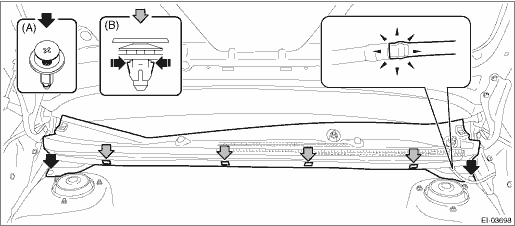
5. Remove the washer nozzle and the washer hose as required. Front Washer Nozzle and Hose > REMOVAL">
 Installation
EXTERIOR/INTERIOR TRIM > Cowl PanelINSTALLATIONCAUTION:Before installing the windshield glass and cowl panel, make sure there are no gravel in the installing area.1. Install the cowl panel assembly ...
 Door trim
...
Other materials:
Overhead console
In the Subaru Ascent, the overhead console provides a convenient storage area
located above the front seats. To open it, gently press upward on the lid at the
"PUSH" marking, and the compartment will automatically release and open smoothly.
WARNING
Do not operate the overhead con ...
Vehicle Dynamics Control warning light/ Vehicle Dynamics Control operation indicator
light
Vehicle Dynamics Control warning light
CAUTION
In the Subaru Ascent, the Vehicle Dynamics Control (VDC) system relies on
the ABS through a shared electrical circuit. If the ABS system becomes inoperative
for any reason, the VDC system will also lose its ability to provide ABS-related
control ...
Installation
VEHICLE DYNAMICS CONTROL (VDC) > Front ABS Wheel Speed SensorINSTALLATIONCAUTION:• Be careful not to damage the sensor.• Do not apply excessive force to the sensor harness.Install each part in the reverse order of removal.NOTE:• Check the identification (mark) on the harness to ...
