
Subaru Crosstrek Service Manual: Removal
CLUTCH SYSTEM > Operating Cylinder
REMOVAL
CAUTION:
Brake fluid spilled on the vehicle body will harm the paint surface; therefore, wash it off with water and wipe clean quickly if spilled.
1. Disconnect the ground cable from battery.
2. Remove the clip (A) from the air intake boot.
3. Loosen the clamp (B) connecting the air intake boot and air cleaner case (rear).
4. Loosen the clamp (C) which connects the air intake boot and throttle body.
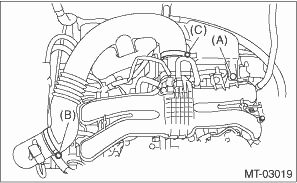
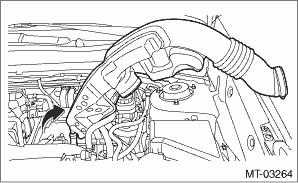
5. Remove the air intake boot from the throttle body, and move it to the left side wheel apron.
6. Disconnect the clutch hose.
CAUTION:
Cover the hose joint to prevent the brake fluid from flowing out.
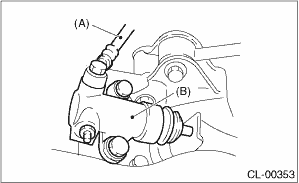
(A) | Clutch hose |
(B) | Operating cylinder |
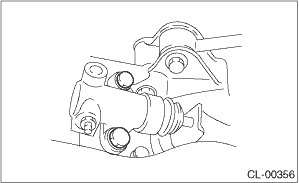
7. Remove the operating cylinder.
 Assembly
CLUTCH SYSTEM > Operating CylinderASSEMBLYNOTE:During assembly, apply hydraulic oil to all parts.Recommended brake fluid:New FMVSS No. 116 DOT3 or DOT41. Install the piston spring.2. Insert piston ...
 Disassembly
CLUTCH SYSTEM > Operating CylinderDISASSEMBLY1. Remove the boot and push rod.2. Apply compressed air through clutch hose attachment hole.NOTE:Face the piston hole down and place a piece of wood und ...
Other materials:
How to change the source
The Pandora operation screen can be
reached by the following methods:
Connecting a Pandora device. Refer to
"Connecting a Bluetooth device" F5-68 or
"Connecting and disconnecting a USB
memory/portable device" F5-17.
Select the "Pandora" key on the source
select screen. Refer to "Selec ...
Dtc c2532 control module peripheral circuit
POWER ASSISTED SYSTEM (POWER STEERING) (DIAGNOSTICS) > Diagnostic Procedure with Diagnostic Trouble Code (DTC)DTC C2532 CONTROL MODULE PERIPHERAL CIRCUITTROUBLE SYMPTOM:• The steering wheel operation feels heavy.• STEERING warning light illuminates.WIRING DIAGRAM:Electric power steeri ...
Specification
WHEEL AND TIRE SYSTEM > General DescriptionSPECIFICATION1. NOTE(1)Inset(2)P.C.D.NOTE:Size and inflation pressure of the standard equipment tire, temporary tire and appropriate tire for equipment are described on the “Tire inflation pressure” label attached to the body side of the driv ...
