
Subaru Crosstrek Service Manual: Removal
BRAKE > Brake Pedal
REMOVAL
1. CVT MODEL
CAUTION:
Before handling the airbag system components, always refer to “CAUTION” of “General Description” in “AIRBAG SYSTEM”. General Description > CAUTION">
1. Disconnect the ground cable from battery and wait for at least 60 seconds before starting work. NOTE">
2. Remove the cover assembly - instrument panel LWR driver. Instrument Panel Lower Cover > REMOVAL">
3. Remove the knee airbag module. Knee Airbag Module > REMOVAL">
4. Remove the universal joint assembly - steering. Universal Joint > REMOVAL">
CAUTION:
To prevent damage to the universal joint assembly - steering and improper steering effort, make sure to remove the universal joint assembly - steering.
5. Remove the column assembly - steering. Steering Column > REMOVAL">
6. Remove the brake pedal assembly.
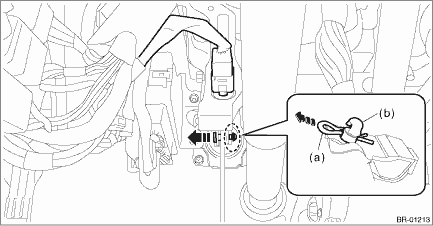
(1) Disconnect the stop light switch connector.
(2) Remove the snap pin (a) and clevis pin (b), and remove the operating rod from the brake pedal.
CAUTION:
• Be careful not to apply excessive force to the operating rod when handling the operating rod.
The angle may change by ±3°, and it may result in damage to power piston cylinder.
• Do not change the push rod length.
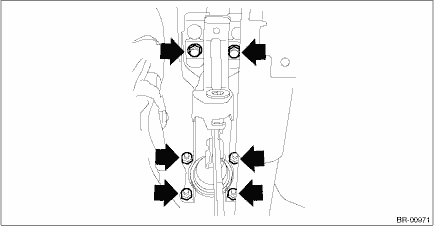
(3) Remove the bolt and nut, and then detach the brake pedal assembly.
2. MT MODEL
NOTE:
Brake pedal is integrated with the clutch pedal.
For removal procedures of the brake pedal, refer to Clutch section. Clutch Pedal > REMOVAL">
 Inspection
BRAKE > Brake PedalINSPECTION1. Move the pad - brake pedal in a horizontal direction with a force of approx. 10 N (1 kgf, 2 lbf), and check that the pedal deflection is in the range of specificatio ...
 Installation
BRAKE > Brake PedalINSTALLATIONCAUTION:Before handling the airbag system components, always refer to “CAUTION” of “General Description” in “AIRBAG SYSTEM”. Gene ...
Other materials:
Welcome lighting function (if
equipped)
The welcome lighting function turns on the
low beam headlight for smooth approaching
to or exiting from the vehicle at night or
in a dark place.
The function is activated while all of the
following conditions are met.
The light control switch is in the
"AUTO" position
It is dark enoug ...
Inspection
FUEL INJECTION (FUEL SYSTEMS)(H4DO) > Engine Coolant Temperature SensorINSPECTION1. Check that the engine coolant temperature sensor has no deformation, cracks or other damages.2. Immerse the engine coolant temperature sensor and a thermometer in water.CAUTION:Take care not to allow water to get ...
Disassembly
CONTINUOUSLY VARIABLE TRANSMISSION(TR580) > Transmission CaseDISASSEMBLY1. Remove the oil stopper plate.2. Remove all plugs from the transmission case.3. Remove the oil seal using a screwdriver wrapped with cloth etc.4. Using the ST, remove the ball bearing of the secondary pulley.(1) Remove the ...
