
Subaru Ascent 2018-2026 Owner's Manual: Rear gate - if the rear gate cannot be opened
If the rear gate of your Subaru Ascent cannot be opened using the standard external button, it is possible to unlock it manually from inside the cargo area as an emergency measure.
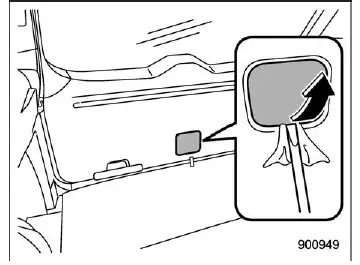
1. Carefully remove the access panel located at the lower center of the rear gate trim. Use a flat-head screwdriver wrapped in cloth or tape to prevent scratching interior surfaces.
2. Behind the trim, locate the internal rear gate release lever.
CAUTION
Do not attempt to operate the rear gate release lever using your fingers, as this may result in injury. Always use a suitable tool such as a flat-head screwdriver.
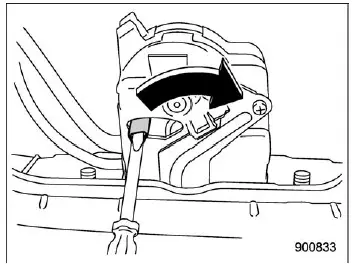
Models without power rear gate
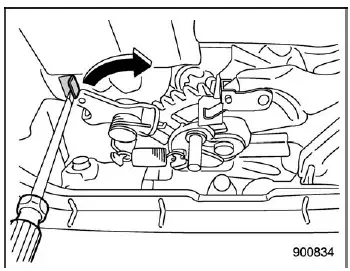
Models with power rear gate
3. To open the rear gate, rotate the internal lever toward the right until the latch releases and the gate can be opened.
For improved reliability, periodically check the condition of your Subaru Ascent key fob battery and ensure that all access mechanisms are functioning properly, as this helps prevent unexpected issues during daily use.
 Access key fob - if access key fob does not operate properly
CAUTION
Keep metallic objects, magnetic devices, and signal transmitters away from
the space between the access key fob and the push-button ignition switch in your
Subaru Ascent. Such interferenc ...
 Malfunctions of the center information display
If your Subaru Ascent displays any of the following abnormal screen behaviors,
it may indicate a temporary glitch or malfunction within the center information
display system.
In many cases, such ...
Other materials:
Wiring diagram
LUBRICATION(H4DO) > Oil Level SwitchWIRING DIAGRAM• Engine electrical system Engine Electrical System > WIRING DIAGRAM">• CAN communication system CAN Communication System > WIRING DIAGRAM"> ...
Inspection
LIGHTING SYSTEM > Door SwitchINSPECTION1. Check the resistance between switch terminals.Preparation tool:Circuit testerTerminal No.Inspection conditionsStandardConnection diagram1 — 3When door is openedLess than 1 ?When door is closed1 M? or more2. Replace the switch assembly - door if the insp ...
Inspection
STARTING/CHARGING SYSTEMS(H4DO) > Battery Current & Temperature SensorINSPECTION1. BATTERY CURRENT SENSORCAUTION:Pay attention to polarity when checking the resistance in the battery current sensor.Check the resistance between the battery current sensor terminals.Terminal No.Standard1 (+) and ...
