
Subaru Crosstrek Service Manual: Preparation tool
CONTINUOUSLY VARIABLE TRANSMISSION (DIAGNOSTICS) > General Description
PREPARATION TOOL
1. SPECIAL TOOL
ILLUSTRATION | TOOL NUMBER | DESCRIPTION | REMARKS |
—
SUBARU SELECT MONITOR 4
Used for setting of each function and troubleshooting for electrical system.
NOTE:
For detailed operation procedures of Subaru Select Monitor 4, refer to “Application help”.
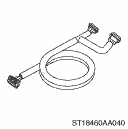
18460AA040
CHECK BOARD
Used for measuring voltage and resistance of TCM terminals.
2. GENERAL TOOL
TOOL NAME | REMARKS |
Circuit tester | Used for measuring resistance, voltage and current. |
Oscilloscope | Used for measuring the sensor. |
DST-i | Used together with Subaru Select Monitor 4. |
 Caution
CONTINUOUSLY VARIABLE TRANSMISSION (DIAGNOSTICS) > General DescriptionCAUTION1. The airbag system wiring harness is routed near the TCM.CAUTION:• All the airbag system wiring harnesses and co ...
 Inspection
CONTINUOUSLY VARIABLE TRANSMISSION (DIAGNOSTICS) > General DescriptionINSPECTION1. BATTERYCheck the battery. Battery > INSPECTION">2. TRANSMISSION GROUNDMake sure that the ground termin ...
Other materials:
Dtc p2757 torque converter clutch pressure control solenoid control circuit performance/stuck off
CONTINUOUSLY VARIABLE TRANSMISSION (DIAGNOSTICS) > Diagnostic Procedure with Diagnostic Trouble Code (DTC)DTC P2757 TORQUE CONVERTER CLUTCH PRESSURE CONTROL SOLENOID CONTROL CIRCUIT PERFORMANCE/STUCK OFFDTC detecting condition:Detected when two consecutive driving cycles with fault occur.Trouble ...
Removal
CONTINUOUSLY VARIABLE TRANSMISSION(TR580) > Primary Speed SensorREMOVALCAUTION:Be sure to prevent water or oil from contacting the connector terminal of primary speed sensor. If adhesion occurs, replace with a new part.1. Remove the transmission assembly. Automatic Transmission Assembly > REM ...
Dtc u0100 lost communication with ecm/pcm a
KEYLESS ACCESS WITH PUSH BUTTON START SYSTEM (DIAGNOSTICS) > Diagnostic Procedure with Diagnostic Trouble Code (DTC)DTC U0100 LOST COMMUNICATION WITH ECM/PCM “A”Detected when CAN data from the engine control module (ECM) does not arrive.NOTE:Perform the diagnosis for LAN system. Basi ...
