
Subaru Ascent 2018-2026 Owner's Manual: Locking and unlocking by holding the access key fob
In the Subaru Ascent, when you carry the access key fob within the effective operating range, you can conveniently lock or unlock the doors, rear gate, and fuel filler lid simply by touching the door handle, without removing the key from your pocket or bag.
NOTE
The Subaru Ascent also allows traditional locking and unlocking using the remote keyless entry buttons on the key fob.
Operating ranges
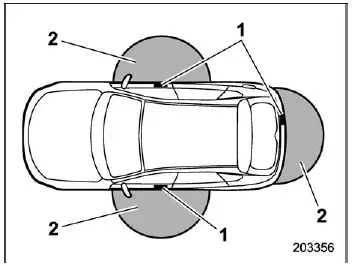
- Antennas
- Operating range (approximately 16 to 32 in (40 to 80 cm))
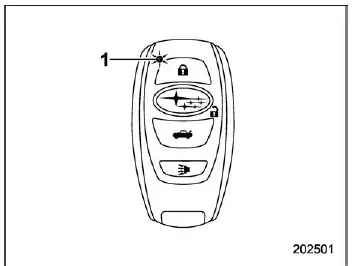
- LED indicator
When the Subaru Ascent access key fob is within range of the front doors, the LED indicator on the fob will flash, confirming communication with the vehicle. If the keyless system is disabled, the LED will only flash when a button is pressed.
NOTE
- If the Subaru Ascent key fob is positioned too close to the vehicle body, the system may not function correctly. Move slightly away and try again.
- If the key fob is near the ground or elevated, signal detection may be inconsistent even within the nominal range.
- When the Subaru Ascent key fob is within range, it is possible for another
person to operate the door handle sensors, even if they are not carrying the
key. However, activation is only possible within the detection zone of the key
fob.
Operation is limited to door handles, lock sensors, rear gate buttons, and other designated touchpoints.
- The Subaru Ascent keyless system will not lock doors if the key fob is detected inside the vehicle. However, under certain environmental conditions, accidental lock-in may still occur. Always confirm that you have the key fob before locking.
- Signal interference from strong radio sources, mobile phones, or low
battery levels may reduce the Subaru Ascent operating range or temporarily disable
the keyless access system.
In such cases, use the manual locking and unlocking procedures described in the appropriate section.
- When washing the Subaru Ascent or exposing the door handles to large amounts of water, the system may unintentionally lock or unlock the doors if the key fob is nearby.
How to lock and unlock
When carrying the Subaru Ascent access key fob, the following operations can be performed seamlessly:
- Locking and unlocking all doors
- Locking and unlocking the rear gate
- Locking and unlocking the fuel filler lid
NOTE
- The Subaru Ascent keyless access system does not operate when the ignition switch is in the "ACC" or "ON" position.
- If you are wearing gloves, the door handle sensor may not respond properly.
- Repeated rapid contact with the lock sensor may cause the system to temporarily ignore input.
- After locking, it is recommended to pull a rear door handle to confirm that the Subaru Ascent is securely locked.
- If any door or the rear gate is not fully closed, the system will alert you with five electronic beeps and five flashes of the hazard lights.
- The Subaru Ascent allows locking even if a door is open; closing it afterward will complete the locking process.
- Within 3 seconds after locking, unlocking via keyless access is temporarily disabled.
- Always carry the Subaru Ascent key fob when locking to prevent accidental lock-in.
- The hazard light confirmation settings can be customized via the center information display or by a SUBARU dealer.
Locking with the door lock sensor
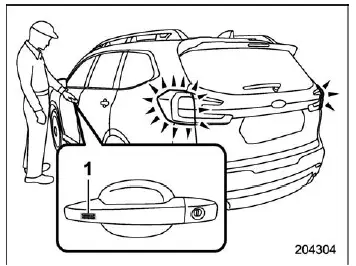
- Door lock sensor
With the Subaru Ascent key fob nearby, close all doors, including the rear gate and fuel lid, then touch the door handle sensor. The system will lock all openings, accompanied by a single chirp and one flash of the hazard lights.
Locking with the rear lock button
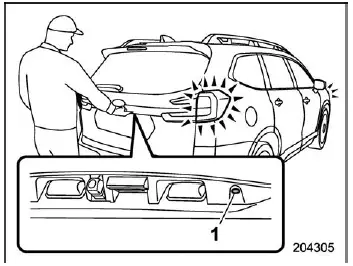
- Rear lock button
Pressing the rear lock button on the Subaru Ascent will secure all doors, the rear gate, and the fuel filler lid, with audible and visual confirmation.
Unlocking
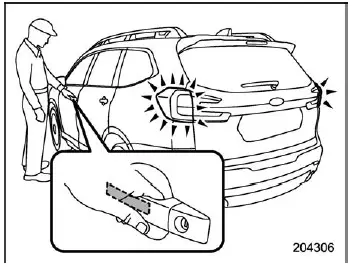
To unlock, carry the Subaru Ascent key fob and grip the door handle:
- Driver’s door: unlocks either only the driver’s door and fuel lid or all doors, depending on settings
- Front passenger door: unlocks all doors, rear gate, and fuel filler lid
The system confirms unlocking with two chirps and two flashes of the hazard lights.
Locking with the power rear gate lock button
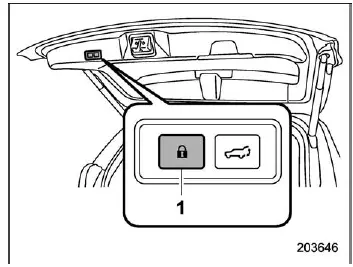
- Power rear gate lock button
Pressing this button on the Subaru Ascent will automatically close the rear gate and lock all vehicle access points, with confirmation signals.
Unlocking rear gate
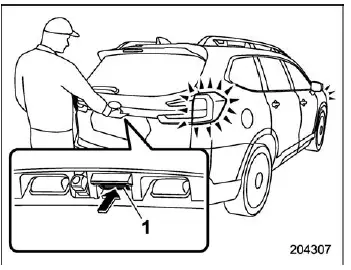
- Rear gate opener button
Press the rear gate opener button while carrying the Subaru Ascent key fob to unlock either the rear gate alone or the entire vehicle, depending on configuration.
Door unlock selection function
The Subaru Ascent allows customization of which doors unlock when using the keyless system.
These settings can be adjusted using:
- The center information display
- An authorized SUBARU dealer
Understanding the Subaru Ascent keyless access system ensures smooth daily operation, enhanced security, and maximum convenience for all users.
 Safety precautions
WARNING
If you are using an implanted pacemaker or defibrillator, maintain a
safe distance of at least 8.7 in (22 cm) from the transmitting antennas installed
in the Subaru Ascent.
The Sub ...
 Unlock using PIN Code Access
In the Subaru Ascent, when all doors including the rear gate are securely locked,
it is possible to unlock the driver's door without using the key fob by utilizing
the convenient PIN Code Acce ...
Other materials:
Dtc b1635 curtain airbag sensor lh failure
AIRBAG SYSTEM (DIAGNOSTICS) > Diagnostic Chart with Trouble CodeDTC B1635 CURTAIN AIRBAG SENSOR LH FAILUREDIAGNOSIS START CONDITION:Ignition voltage is 10 V to 16 V.DTC DETECTING CONDITION:Curtain airbag sensor (LH) is faulty.If DTC B1635 is displayed, the circuit within the curtain airbag sensor ...
Dtc u0101 lost communication with tcm
LAN SYSTEM (DIAGNOSTICS) > Diagnostic Procedure with Diagnostic Trouble Code (DTC)DTC U0101 LOST COMMUNICATION WITH TCMDTC detecting condition:No data is received from TCM.Trouble symptom:Cooperation control with transmission is not performed.STEPCHECKYESNO1.CHECK PERFORMING OF BASIC DIAGNOSTIC P ...
Inspection
CONTINUOUSLY VARIABLE TRANSMISSION (DIAGNOSTICS) > AT OIL TEMP Warning Light DisplayINSPECTIONDIAGNOSIS:• CAN communication is lost with the combination meter.• Combination meter malfunction• TCM is in special control mode.• AT learning is not finished.TROUBLE SYMPTOM:&bul ...
