
Subaru Ascent 2018-2026 Owner's Manual: Safety precautions
WARNING
- If you are using an implanted pacemaker or defibrillator, maintain a
safe distance of at least 8.7 in (22 cm) from the transmitting antennas installed
in the Subaru Ascent.
The Subaru Ascent keyless access system emits radio waves that may interfere with the normal operation of implanted medical devices. This interference, although rare, could potentially affect device performance.
If you rely on other electronic medical equipment, consult both the equipment manufacturer and relevant Subaru Ascent documentation before using the keyless access with push-button start system. Understanding how radio frequency signals interact with medical devices is critical for ensuring safe operation.
Refer to the section titled "Radio waves used for the keyless access with push-button start system" for additional technical details.
- The Subaru Ascent keyless access system operates using radio waves, including a frequency of approximately 134 kHz, in addition to signals used by the remote keyless entry system. These signals are periodically transmitted from antennas located throughout the vehicle.
* Radio frequency: 134 kHz
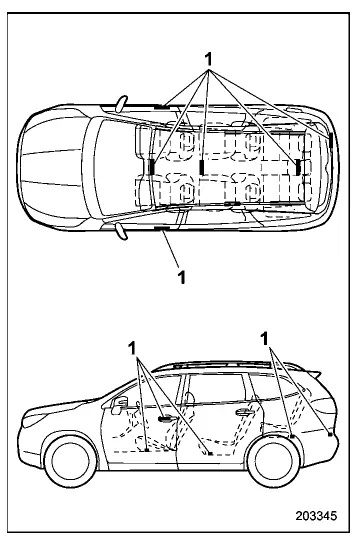
- Antennas
CAUTION
- Never leave the Subaru Ascent access key fob inside the vehicle or within a radius of approximately 6.6 ft (2 m). Doing so may result in accidental lock-in or unnecessary battery drain. In certain conditions, the push-button ignition system may not function properly depending on the fob's position.
- The Subaru Ascent access key fob contains sensitive electronic components.
To ensure long-term reliability, observe the following precautions:
- Have the battery replaced by an authorized SUBARU dealer to avoid damage or incorrect installation.
- Avoid exposure to water. If the key fob becomes wet, dry it immediately and thoroughly.
- Protect the key fob from strong impacts or drops.
- Do not expose the key fob to direct sunlight or high temperatures, such as leaving it on the dashboard.
- Do not clean the key fob using ultrasonic devices.
- Avoid storing the key fob in humid or dusty environments, as this
may cause malfunction.
Always keep it in a clean and dry location.
- Keep the Subaru Ascent key fob away from strong magnetic fields.
- Do not place the key fob near computers, household appliances, or charging devices.
- Avoid proximity to battery chargers or electrical accessories that may interfere with signal transmission.
- Do not apply metallic window tint or attach metallic objects to windows, as this may disrupt signal communication.
- Use only genuine Subaru Ascent accessories to ensure compatibility with the keyless system.
- If the Subaru Ascent access key fob is dropped, the internal emergency key may become loose. Check and secure it to prevent loss.
- When traveling by airplane, avoid pressing any buttons on the Subaru Ascent key fob. Radio signals may interfere with aircraft systems. Store the key in a way that prevents accidental button activation.
NOTE
- The Subaru Ascent keyless access function can be customized to operate or be disabled depending on user preferences.
- For operation of the push-button ignition when keyless access is disabled, refer to the section "Access key fob - if access key fob does not operate properly".
- The Subaru Ascent keyless system uses low-power radio signals. Environmental
factors and surrounding electronic devices may interfere with communication
between the vehicle and the key fob under the following conditions:
- Near facilities transmitting strong radio signals, such as broadcast towers or power lines
- When using other radio transmitters, such as another vehicle's key fob
- When carrying multiple key fobs together
- When the Subaru Ascent key fob is near mobile phones or wireless communication devices
- When placed near metallic objects or accessories
- When carried alongside electronic devices such as laptops
- When the key fob battery is weak or discharged
- The Subaru Ascent access key fob continuously communicates with the vehicle, which results in gradual battery consumption even when not actively used. Regular battery checks are recommended.
Understanding these Subaru Ascent safety precautions ensures reliable operation of the keyless access system and helps prevent unexpected issues related to signal interference, battery life, or electronic compatibility.
In the Subaru Ascent, the lifespan of the access key fob battery depends on usage patterns and environmental conditions, but under normal circumstances it typically ranges from approximately 1 to 2 years. Frequent use of remote functions or exposure to extreme temperatures may reduce battery life.
If the battery in your Subaru Ascent key fob becomes fully discharged, it should be replaced promptly with a new one to ensure uninterrupted operation of the keyless access and push-button start system.
This precaution helps maintain vehicle security and prevents unauthorized access. For proper reregistration procedures, always contact an authorized SUBARU dealer.
- Turn the push-button ignition switch to the "OFF" position.
For detailed instructions, refer to the "Switching power status" section in your Subaru Ascent manual.
- Open and close the driver's door completely.
- Wait approximately 10 seconds to allow the system to reset and initialize.
Once the steering lock engages, the initialization process in the Subaru Ascent is successfully completed.
- To prevent operational issues, do not leave the Subaru Ascent access
key fob in the following locations:
- On the instrument panel
- On the floor of the vehicle
- Inside the glove box
- Within door storage compartments
- On the rear seats
- In the cargo area
If the Subaru Ascent key fob is left in these areas, the following issues may occur.
- The access key fob may become unintentionally locked inside the Subaru Ascent.
- The system may generate false warning messages even when no actual malfunction is present.
- In some cases, real system malfunctions may not trigger any warning alerts.
Proper handling and storage of the Subaru Ascent access key fob ensures reliable operation, extended battery life, and enhanced vehicle security in everyday use.
 Keyless access with push-button start system
The Subaru Ascent may also be equipped with an advanced keyless access system
featuring push-button start, enhancing both convenience and security.
Access key fob (main)
Access key fob (su ...
 Locking and unlocking by holding the access key fob
In the Subaru Ascent, when you carry the access key fob within the effective
operating range, you can conveniently lock or unlock the doors, rear gate, and fuel
filler lid simply by touching the d ...
Other materials:
Cooling system
Safety precautions
WARNING
Never attempt to remove the radiator cap on your Subaru Ascent while the engine
is still hot or running. The cooling system operates under pressure, and opening
the cap prematurely can release a burst of boiling coolant, resulting in severe
burns and serious injury ...
Installation
FUEL INJECTION (FUEL SYSTEMS)(H4DO) > Fuel Filler PipeINSTALLATION1. Open the fuel filler lid.2. Insert the fuel filler pipe assembly into the rubber saucer from inside of the rear fender.3. Install the fuel filler pipe assembly to the vehicle.Tightening torque:7.5 N·m (0.8 kgf-m, 5.5 ft-l ...
Removal
CONTINUOUSLY VARIABLE TRANSMISSION(TR580) > Transmission CaseREMOVAL1. Remove the transmission assembly from the vehicle. Automatic Transmission Assembly > REMOVAL">2. Remove the air breather hose. Air Breather Hose > REMOVAL">3. Remove the control valve body. Control Val ...
