
Subaru Crosstrek Service Manual: Inspection
LIGHTING SYSTEM > Spot Map Light
INSPECTION
1. SPOT MAP LIGHT BULB
1. Visually check the bulb for blow out.
2. Check the bulb specification. General Description > SPECIFICATION">
3. Replace the bulb if it is found defective.
2. SPOT MAP LIGHT SWITCH
1. Check the resistance between switch terminals.
Preparation tool:
Circuit tester
• Models without EyeSight
– Model without sunroof
Terminal No. | Inspection conditions | Standard | Connection diagram |
1 — 2 | Switch OFF | 1 M? or more |
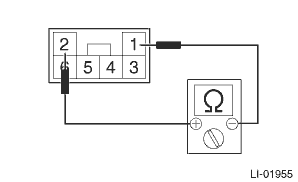
Switch ON
Approx. 18 ?
– Model with sunroof
Terminal No. | Inspection conditions | Standard | Connection diagram |
1 — 4 | Switch OFF | 1 M? or more |
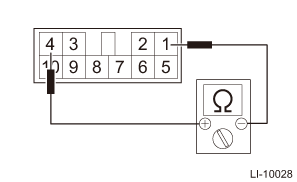
Switch ON
Approx. 18 ?
• Models with EyeSight
Terminal No. | Inspection conditions | Standard | Connection diagram |
11 — 12 | Switch OFF | 1 M? or more |
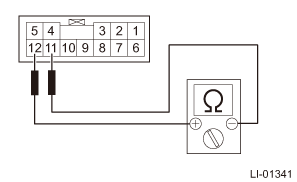
Switch ON
Approx. 18 ?
2. Replace the light assembly - map if the inspection result is not within the standard value.
 Spot map light
...
 Removal
LIGHTING SYSTEM > Spot Map LightREMOVAL1. MODELS WITHOUT EyeSight1. Disconnect the ground cable from battery. NOTE">2. Remove the light assembly - map.CAUTION:When using a flat tip screwdr ...
Other materials:
Installation
MECHANICAL(H4DO) > Engine AssemblyINSTALLATION1. Install the engine mounting onto the engine.Tightening torque:35 N·m (3.6 kgf-m, 25.8 ft-lb)2. Apply a small amount of grease to splines of main shaft. (MT model)Grease:NICHIMOLY N-130 or equivalent3. Position the engine in engine compartmen ...
Engine wiring harness and transmission cord Location
WIRING SYSTEM > Engine Wiring Harness and Transmission CordLOCATIONConnectorConnecting toNo.PoleColorAreaNo.DescriptionE254BlackA-3B21Bulkhead wiring harnessE316BrownA-3B22E42BlueB-4 Purge control solenoid valveE52Dark grayB-2 Fuel injector No. 1E62Dark grayA-2 Fuel injector No. 3E82BlackB-2 Engi ...
Installation
CONTROL SYSTEMS > Select LeverINSTALLATION1. Set the select lever assembly to the vehicle body.2. Tighten the four mounting bolts to attach the select lever assembly to the vehicle body.Tightening torque:18 N·m (1.8 kgf-m, 13.3 ft-lb)3. Connect the harness connector.4. Install the harness ...
