
Subaru Crosstrek Service Manual: Removal
LIGHTING SYSTEM > Spot Map Light
REMOVAL
1. MODELS WITHOUT EyeSight
1. Disconnect the ground cable from battery. NOTE">
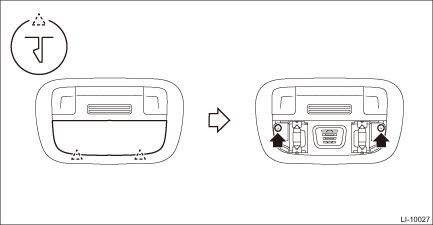
2. Remove the light assembly - map.
CAUTION:
When using a flat tip screwdriver, use an appropriate sized tool for the insertion opening, apply protective tape or cloth around the tool, and be careful not to cause damage.
(1) Release the claws and remove the lens.
(2) Remove the screws and pull out the light assembly - map.
• Model without sunroof
• Model with sunroof
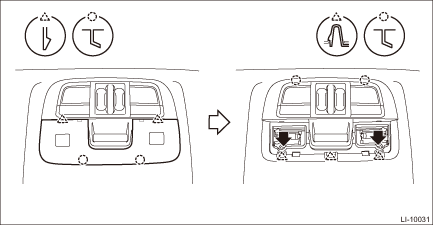
(3) Disconnect the connector and remove the light assembly - map and the bulb.
CAUTION:
Use a dry clean cloth so that no grease or water adheres to the glass portion of the bulb.
2. MODELS WITH EyeSight
NOTE:
The spot map light is a single unit with the stereo camera cover.
1. Disconnect the ground cable from battery. NOTE">
2. Remove the stereo camera cover. Stereo Camera > REMOVAL">
CAUTION:
When using a flat tip screwdriver, use an appropriate sized tool for the insertion opening, apply protective tape or cloth around the tool, and be careful not to cause damage.
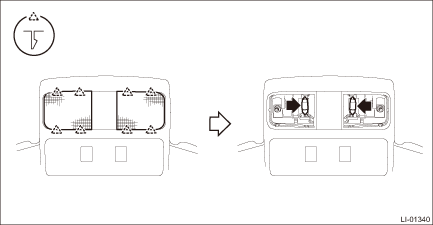
3. Release the claws and remove the lens.
4. Remove the bulb.
CAUTION:
Use a dry clean cloth so that no grease or water adheres to the glass portion of the bulb.
 Inspection
LIGHTING SYSTEM > Spot Map LightINSPECTION1. SPOT MAP LIGHT BULB1. Visually check the bulb for blow out.2. Check the bulb specification. General Description > SPECIFICATION">3. Replace ...
 Installation
LIGHTING SYSTEM > Spot Map LightINSTALLATIONInstall each part in the reverse order of removal. ...
Other materials:
Check list for interview Check
OCCUPANT DETECTION SYSTEM (DIAGNOSTICS) > Check List for InterviewCHECK1. CONDITIONS OF MALFUNCTIONCustomer’s Name Inspector’s Name Date Vehicle Brought in/ /Registration No. Odometer readingkmmilesV.I.N. Date Problem Occurred/ /Registration Year/ /Occ ...
Steering
SPECIFICATIONS > CrosstrekSTEERINGModel2.0 L DOHC non-turboTypeRack and pinionElectric power steeringTurns, lock to lock2.8Minimum turning radiusm (ft)5.3 (17.39) ...
STARLINKTM 7.0 Multimedia Plus audio set (U.S. spec. models only, if
equipped)
The audio set will operate only when the
ignition switch is in the "ACC" or "ON"
position.
For details about how to use the
STARLINKTM 7.0 Multimedia Plus audio
set, refer to the STARLINKTM 7.0 Multimedia
Plus or STARLINKTM 7.0 Multimedia
Navigation Owner's Manual.
NOTE
HD Radio Techn ...
