
Subaru Crosstrek Owners Manual: STARLINKTM 7.0 Multimedia Plus audio set (U.S. spec. models only, if equipped)
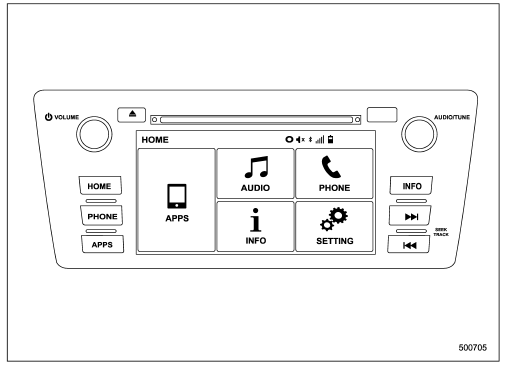
The audio set will operate only when the ignition switch is in the "ACC" or "ON" position.
For details about how to use the STARLINKTM 7.0 Multimedia Plus audio set, refer to the STARLINKTM 7.0 Multimedia Plus or STARLINKTM 7.0 Multimedia Navigation Owner's Manual.
NOTE
HD Radio Technology should be included as a feature in the STARLINKTM 7.0 Multimedia Plus audio set.
 Base display audio set (if equipped)
Power/VOLUME knob
Eject button
AUDIO/TUNE knob
HOME button
APPS button
Display
SEEK/TRACK buttons
The audio set will operate only when the
ignition switch is in the "ACC" or "ON ...
 Tips for operating the audio/visual system
CAUTION
To avoid damage to the audio/visual
system:
Be careful not to spill beverages
over the audio/visual system.
Do not put anything other than an
appropriate disc into the disc
slot. ...
Other materials:
Removal
MANUAL TRANSMISSION AND DIFFERENTIAL(5MT) > Drive Pinion Shaft AssemblyREMOVAL1. Remove the manual transmission assembly from the vehicle. Manual Transmission Assembly > REMOVAL">2. Remove the transfer case together with the extension case assembly. Transfer Case and Extension Case A ...
Inspection
CLUTCH SYSTEM > Master CylinderINSPECTIONIf any damage, deformation, wear, swelling, rust or other faults are found on the cylinder, piston, push rod, nipple, return spring, bleeder screw, seat or hose, replace the faulty part.(A)Master cylinder body(B)Seat(C)Return spring(D)Piston(E)Piston stop ...
Washing the underbody
Chemicals, salts and gravel used for
deicing road surfaces are extremely corrosive,
accelerating the corrosion of underbody
components, such as the exhaust
system, fuel and brake lines, brake
cables, floor pan and fenders, and suspension.
Thoroughly flush the underbody and inside
of the fen ...
