
Subaru Crosstrek Service Manual: Disposal
REAR SUSPENSION > Rear Shock Absorber
DISPOSAL
CAUTION:
• Before discarding the strut COMPL and the shock absorber COMPL, be sure to wear goggles to protect eyes from gas, oil and cutting powder.
• Do not disassemble the strut COMPL and the shock absorber COMPL or throw them into flames.
• When discarding the strut COMPL and the shock absorber COMPL filled with gas, drill a hole on them to purge the gas.
1. Place the shock absorber on a level surface with the piston rod fully expanded.
2. Make a hole into the specified position 30 mm (1.18 in) deep using a drill with 2 — 3 mm (0.08 — 0.12 in) diameter.
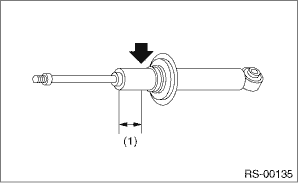
(1) | 40 mm (1.57 in) |
 Disassembly
REAR SUSPENSION > Rear Shock AbsorberDISASSEMBLY1. Using a coil spring compressor, compress the coil spring.2. Using a hexagon wrench to prevent the shock absorber piston rod from turning, remove t ...
 Inspection
REAR SUSPENSION > Rear Shock AbsorberINSPECTION1. Check for oil leaks.2. Move the piston rod up and down to check that it operates smoothly without any hitch.3. Check the piston rod for play as fol ...
Other materials:
Top tether anchorages
Your vehicle is equipped with three top
tether anchorages so that a child restraint
system having a top tether can be
installed in the rear seat. When installing
a child restraint system using top tether,
proceed as follows, while observing the
instructions by the child restraint system
manuf ...
Clear memory mode Operation
LAN SYSTEM (DIAGNOSTICS) > Clear Memory ModeOPERATION1. On «Start» display, select «Diagnosis».2. On «Vehicle selection» display, input the target vehicle information and select «Confirmed».3. On «Main Menu» display, select «All diagnosis code».On «All diagnosis code» display, selec ...
Removal
POWER ASSISTED SYSTEM (POWER STEERING) > Steering ColumnREMOVALCAUTION:Before handling the airbag system components, always refer to “CAUTION” of “General Description” in “AIRBAG SYSTEM”. General Description > CAUTION">1. Disconnect the ground cable ...
