
Subaru Crosstrek Service Manual: Diagnostic procedure for subaru select monitor communication Communication for initializing impossible
HVAC SYSTEM (AUTO A/C) (DIAGNOSTICS) > Diagnostic Procedure for Subaru Select Monitor Communication
COMMUNICATION FOR INITIALIZING IMPOSSIBLE
Diagnosis:
Defective CAN communication circuit
Trouble symptom:
• LAN system is abnormal.
• Communication failure between Subaru Select Monitor and A/C control panel
Wiring diagram:
Air conditioning system Air Conditioning System > WIRING DIAGRAM">
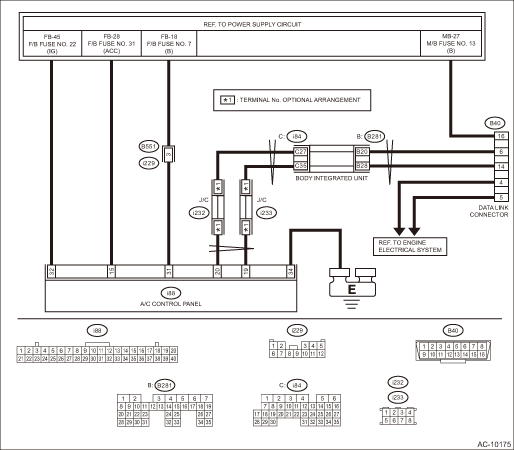
| STEP | CHECK | YES | NO |
1.CHECK POWER SUPPLY CIRCUIT.
Connect DST-i to data link connector.
Does DST-i turn ON?
Diagnostic Procedure for Subaru Select Monitor Communication > COMMUNICATION FOR INITIALIZING IMPOSSIBLE">Go to Step 4.
Diagnostic Procedure for Subaru Select Monitor Communication > COMMUNICATION FOR INITIALIZING IMPOSSIBLE">Go to Step 2.
2.CHECK POWER SUPPLY CIRCUIT.
Measure the voltage between data link connector and chassis ground.
Connector & terminal
(B40) No. 16 (+) — Chassis ground (−):
Is the voltage 10 V or more?
Diagnostic Procedure for Subaru Select Monitor Communication > COMMUNICATION FOR INITIALIZING IMPOSSIBLE">Go to Step 3.
Repair the power supply circuit.
NOTE:
In this case, repair the following item:
• Open or ground short circuit of harness between battery and data link connector
• Blown out of fuse (M/B No. 12)
3.CHECK HARNESS BETWEEN DATA LINK CONNECTOR AND CHASSIS GROUND (OPEN).
1) Turn the ignition switch to OFF.
2) Measure the resistance of harness between data link connector and chassis ground.
Connector & terminal
(B40) No. 4 — Chassis ground:
(B40) No. 5 — Chassis ground:
Is the resistance less than 5 ??
Repair the poor contact of data link connector.
Repair the harness and connector.
4.CHECK SUBARU SELECT MONITOR.
1) Connect the Subaru Select Monitor to a normal vehicle.
2) Start the engine and perform communication between the Subaru Select Monitor and vehicle.
Is communication possible?
Diagnostic Procedure for Subaru Select Monitor Communication > COMMUNICATION FOR INITIALIZING IMPOSSIBLE">Go to Step 5.
Use another Subaru Select Monitor because the CAN communication circuit of the Subaru Select Monitor is faulty.
5.CHECK LAN SYSTEM.
Check the LAN system. Basic Diagnostic Procedure > PROCEDURE">
Is LAN system normal?
Diagnostic Procedure for Subaru Select Monitor Communication > COMMUNICATION FOR INITIALIZING IMPOSSIBLE">Go to Step 6.
Repair it according to the diagnosis for LAN system.
6.CHECK CONNECTOR.
Check for poor contact of power supply circuit connector.
Is there poor contact of connector?
Repair the connector.
Diagnostic Procedure for Subaru Select Monitor Communication > COMMUNICATION FOR INITIALIZING IMPOSSIBLE">Go to Step 7.
7.CHECK FUSE.
1) Turn the ignition switch to OFF.
2) Remove a fuse from the fuse box.
3) Check the fuse.
Is the fuse blown out?
Replace the fuse.
Diagnostic Procedure for Subaru Select Monitor Communication > COMMUNICATION FOR INITIALIZING IMPOSSIBLE">Go to Step 8.
8.CHECK A/C CONTROL PANEL POWER CIRCUIT.
1) Disconnect the A/C control panel connector.
2) Measure the voltage between A/C control panel connector terminal and chassis ground after turning the ignition switch to ON.
Connector & terminal
(i88) No. 15 (+) — Chassis ground (−):
(i88) No. 31 (+) — Chassis ground (−):
(i88) No. 32 (+) — Chassis ground (−):
Is the voltage 10 V or more?
Diagnostic Procedure for Subaru Select Monitor Communication > COMMUNICATION FOR INITIALIZING IMPOSSIBLE">Go to Step 9.
Check for open or short circuit in the harness between A/C control panel and fuse.
9.CHECK A/C CONTROL PANEL GROUND CIRCUIT (OPEN).
Measure the resistance of harness between A/C control panel and chassis ground.
Connector & terminal
(i88) No. 34 — Chassis ground:
Is the resistance less than 5 ??
Check the connection between the data link connector and Subaru Select Monitor.
Repair the harness for ground line.
 Clear memory mode Operation
HVAC SYSTEM (AUTO A/C) (DIAGNOSTICS) > Clear Memory ModeOPERATION1. On «Start» display, select «Diagnosis».2. On «Vehicle selection» display, input the target vehicle information and select  ...
 Electrical component location Location
HVAC SYSTEM (AUTO A/C) (DIAGNOSTICS) > Electrical Component LocationLOCATION1. OUTSIDE VEHICLE(1)A/C compressor(3)Pressure switch(4)Ambient sensor(2)A/C relay 2. COMPARTMENT(1)Air mix door actua ...
Other materials:
Automatic Locking Retractor/Emergency Locking Retractor (ALR/ELR)
Each passenger's seatbelt has an Automatic
Locking Retractor/Emergency Locking
Retractor (ALR/ELR). The Automatic
Locking Retractor/Emergency Locking
Retractor normally functions as an Emergency
Locking Retractor (ELR). The ALR/
ELR has an additional locking mode
"Automatic Locking Retractor ...
Dtc c2221 transmitter 1 pressure data abnormal
TIRE PRESSURE MONITORING SYSTEM (DIAGNOSTICS) > Diagnostic Procedure with Diagnostic Trouble Code (DTC)DTC C2221 TRANSMITTER 1 PRESSURE DATA ABNORMALNOTE:Refer to DTC C2224 for diagnostic procedure. Diagnostic Procedure with Diagnostic Trouble Code (DTC) > DTC C2224 TRANSMITTER 4 PRESSURE DAT ...
Models with "keyless access with push-button start system"
NOTE
For more details, refer to the Owner's
Manual supplement for the remote
engine start system.
Access key
Lock button
An access key can be used as the remote
engine start transmitter. Operate the lock
button to start or stop the engine as
follows.
Before starting the engine
Befo ...
