
Subaru Crosstrek Service Manual: Electrical component location Location
HVAC SYSTEM (AUTO A/C) (DIAGNOSTICS) > Electrical Component Location
LOCATION
1. OUTSIDE VEHICLE
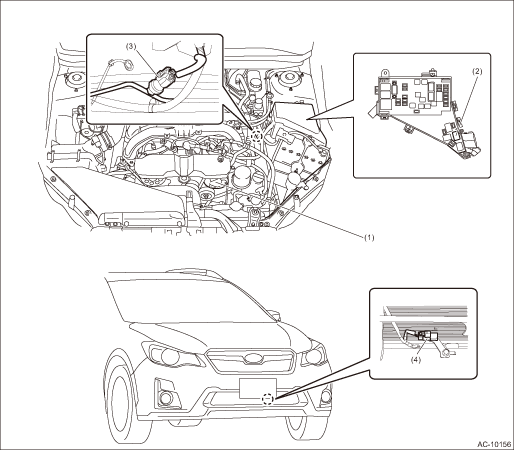
(1) | A/C compressor | (3) | Pressure switch | (4) | Ambient sensor |
(2) | A/C relay |
2. COMPARTMENT
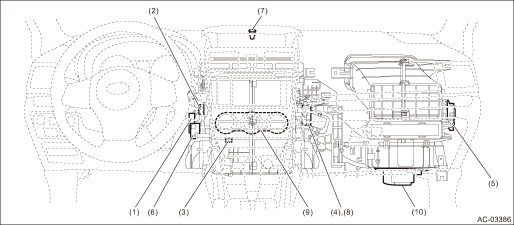
(1) | Air mix door actuator LH*2 | (5) | Intake door actuator | (9) | A/C control panel |
(2) | In-vehicle sensor | (6) | Mode door actuator | (10) | Blower motor |
(3) | Evaporator sensor | (7) | Sunload sensor | ||
(4) | Air mix door actuator RH*2 | (8) | Air mix door actuator*1 |
*1: Without left/right independent air conditioning function
*2: With left/right independent air conditioning function
 Diagnostic procedure for subaru select monitor communication Communication for initializing impossible
HVAC SYSTEM (AUTO A/C) (DIAGNOSTICS) > Diagnostic Procedure for Subaru Select Monitor CommunicationCOMMUNICATION FOR INITIALIZING IMPOSSIBLEDiagnosis:Defective CAN communication circuitTrouble symp ...
 List of diagnostic trouble code (dtc) List
HVAC SYSTEM (AUTO A/C) (DIAGNOSTICS) > List of Diagnostic Trouble Code (DTC)LISTDTCItemContent of diagnosisNoteB1430IN-VEHICLE (POST EVAPORATOR) TEMPERATURE SENSOR CIRCUIT OPENIn-vehicle air temper ...
Other materials:
List of diagnostic trouble code (dtc) List
ENGINE (DIAGNOSTICS)(H4DO) > List of Diagnostic Trouble Code (DTC)LISTDTCItemNoteB1570ANTENNA Diagnostic Procedure with Diagnostic Trouble Code (DTC) > DTC B1570 ANTENNA">B1571REFERENCE CODE INCOMPATIBILITY (IMMOBILIZER CM TO ECM) Diagnostic Procedure with Diagnostic Trouble Code (DTC) ...
Daylight saving time setting
1. Perform the preparation steps according
to "Preparation for date setting" 3-
56.
2. Operate the "
" or "
"
switch to
select the "Daylight Saving Time" item.
Then push the
button.
3. The current setting will be displayed.
Push the
button to enter the selection ...
Touch screen gestures
Operations are performed by touching the touch screen directly with your
finger.
Operation method
Outline
Main use
TouchQuickly touch and release
once.
Changing and selecting various
settings
Drag*Touch the screen with your
finger, and mo ...
