
Subaru Crosstrek Owners Manual: Daylight saving time setting
1. Perform the preparation steps according to "Preparation for date setting" 3- 56.
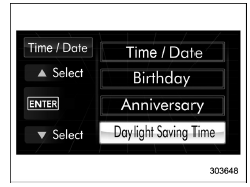
2. Operate the " " or "
 "
switch to
select the "Daylight Saving Time" item.
"
switch to
select the "Daylight Saving Time" item.
Then push the
 button.
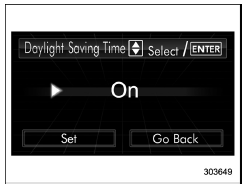
3. The current setting will be displayed.
Push the
 button to enter the selection
mode.
button to enter the selection
mode.
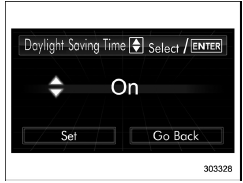
4. Select "On" or "Off" by operating the
"
 " or "
 " switch. Then push the
 button.
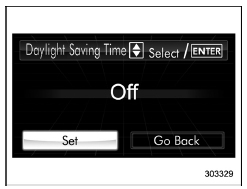
 5. Select "Set" by operating the " "
switch, and confirm the setting by pushing
the
5. Select "Set" by operating the " "
switch, and confirm the setting by pushing
the
 button.
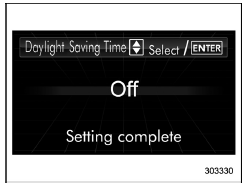
6. The system will notify you that the setting is complete.
 Clearing birthday or anniversary
1. Perform the preparation steps according
to "Preparation for date setting" 3-56
and display "Birthday" or "Anniversary" on
the screen.
2. Select the preferred birthday/anniversary.
3. When ...
 Image quality and volume settings
The image quality and volume settings
can be adjusted. To change the items,
operate the " " or " " switch. ...
Other materials:
By outgoing calls
On the phone (menu) screen, select the
"Outgoing Calls" key to open the "Outgoing
Calls" screen. You can make a call
by selecting an item in the outgoing call
history list.
If there is no outgoing call history, a
message appears to indicate that there
is no outgoing call history data.
...
Dtc p2097 post catalyst fuel trim system too rich bank 1
ENGINE (DIAGNOSTICS)(H4DO) > Diagnostic Procedure with Diagnostic Trouble Code (DTC)DTC P2097 POST CATALYST FUEL TRIM SYSTEM TOO RICH BANK 1DTC detecting condition:Detected when two consecutive driving cycles with fault occur.CAUTION:After servicing or replacing faulty parts, perform Clear Memory ...
Disassembly
FUEL INJECTION (FUEL SYSTEMS)(H4DO) > Intake ManifoldDISASSEMBLY1. Remove the throttle body. Throttle Body > REMOVAL">2. Remove the purge control solenoid valve. Purge Control Solenoid Valve > REMOVAL">3. Remove the manifold absolute pressure sensor. Manifold Absolute Pre ...
