
Subaru Crosstrek Owners Manual: Windshield wiper blade rubber

1) Metal support
1. Grasp the locked end of the blade rubber assembly and pull it firmly until the stoppers on the rubber are free of the metal support.
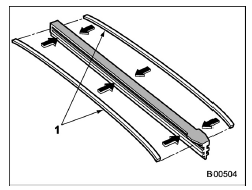
1) Metal spines
2. If the new blade rubber is not provided with two metal spines, remove the metal spines from the old blade rubber and install them in the new blade rubber.
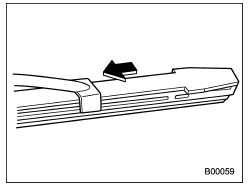
3. Align the claws of the metal support with the grooves in the rubber and slide the blade rubber assembly into the metal support until it locks.
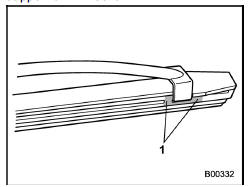
1) Stopper
4. Be sure to position the claws at the end of the metal support between the stoppers on the rubber as shown. If the rubber is not retained properly, the wiper blade may scratch the windshield.
 Windshield wiper blade assembly
1. Raise the wiper arm off the windshield.
1) Stopper
2. Remove the wiper blade assembly by
holding its pivot area and pushing it in the
direction shown by the arrow while depressing
the wipe ...
 Rear window wiper blade assembly
1. Raise the wiper arm off the rear
window.
2. Turn the wiper blade assembly counterclockwise.
3. Pull the wiper blade assembly toward
you to remove it from the wiper arm.
4. Install th ...
Other materials:
Removal
EXTERIOR BODY PANELS > Rear Sealing CoverREMOVAL1. Disconnect the ground cable from battery. NOTE">2. Remove the trim panel - rear door. Door Trim > REMOVAL">3. Remove the sealing cover - rear door.CAUTION:• Carefully remove the butyl tape. Excessive force will easily b ...
Removal
SUNROOF/T-TOP/CONVERTIBLE TOP (SUNROOF) > Sunroof SwitchREMOVAL1. Disconnect the ground cable from battery. NOTE">2. Remove the light assembly - map. (Models without EyeSight) Spot Map Light > REMOVAL">3. Remove the stereo camera cover assembly. (Models with EyeSight) Stereo ...
Key lock cylinders Replacement
SECURITY AND LOCKS > Key Lock CylindersREPLACEMENT1. STEERING LOCK1. Disconnect the ground cable from battery. NOTE">2. Remove the cover assembly - column.(1) Remove the screws by turning the steering wheel to right and left.(2) Release the claw, and remove the cover assembly - column UP ...
