
Subaru Crosstrek Owners Manual: Wear indicators
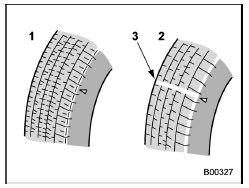
- New tread
- Worn tread
- Tread wear indicator
Each tire incorporates a tread wear indicator, which becomes visible when the depth of the tread grooves decreases to 0.063 in (1.6 mm). A tire must be replaced when the tread wear indicator appears as a solid band across the tread.
WARNING
When a tire's tread wear indicator becomes visible, the tire is worn beyond the acceptable limit and must be replaced immediately. With a tire in this condition, driving at high speeds in wet weather can cause the vehicle to hydroplane.
The resulting loss of vehicle control can lead to an accident.
NOTE
For safety, inspect tire tread regularly and replace the tires before their tread wear indicators become visible.
 Wheel balance
Each wheel was correctly balanced when
your vehicle was new, but the wheels will
become unbalanced as the tires become
worn during use. Wheel imbalance causes
the steering wheel to vibrate slightl ...
 Tire rotation direction mark
Example of tire rotation direction mark
Front
If the tire has the rotation direction
specification, the tire rotation direction
mark is placed on its sidewall.
When you install a tire ...
Other materials:
Assembly
CONTINUOUSLY VARIABLE TRANSMISSION(TR580) > Converter CaseASSEMBLY1. Install the oil drain plug.Tightening torque:70 N·m (7.1 kgf-m, 51.6 ft-lb)2. Install the overflow drain plug.NOTE:Overflow plug of differential gear oil is temporarily attached.3. Install all plugs.NOTE:Use new O-rings.T ...
Preparation tool
AIRBAG SYSTEM > General DescriptionPREPARATION TOOL1. SPECIAL TOOL• TEST HARNESS NILLUSTRATIONTOOL NUMBERDESCRIPTIONREMARKS98299SA000TEST HARNESS NUsed for unit inspection of steering roll connector.• TEST HARNESS QILLUSTRATIONTOOL NUMBERDESCRIPTIONREMARKS98299SA040TEST HARNESS QUsed ...
Windshield wiper blade rubber
1) Metal support
1. Grasp the locked end of the blade
rubber assembly and pull it firmly until the
stoppers on the rubber are free of the
metal support.
1) Metal spines
2. If the new blade rubber is not provided
with two metal spines, remove the metal
spines from the old blade rubber ...
