
Subaru Crosstrek Owners Manual: To increase the speed (by the "RES/ SET" switch)
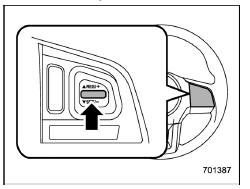
Press the "RES/SET" switch to the "RES" side and hold it until the vehicle reaches the desired speed. Then, release the switch. The vehicle speed at that moment will be memorized and treated as the new set speed.
U.S.-spec. models
When the difference between the actual vehicle speed and the set speed is small, the set speed can be increased 1 mph (1.6 km/h) each time by pressing the "RES/SET" switch to the "RES" side quickly.
Except U.S.-spec. models
When the difference between the actual vehicle speed and the set speed is small, the set speed can be increased 1 km/h each time by pressing the "RES/SET" switch to the "RES" side quickly.

 To increase the speed (by accelerator pedal)
1. Depress the accelerator pedal to
accelerate the vehicle to the desired
speed.
2. Press the "RES/SET" switch to the
"SET" side once. Now the desired speed
is set and the vehicle will keep r ...
Other materials:
Center information display (CID)
WARNING
While operating the center information display in the Subaru Ascent, always
maintain full attention to driving conditions. If interacting with the display interferes
with your concentration, safely stop the vehicle before making any adjustments.
Looking at the screen for extended peri ...
Dtc p0303 cylinder 3 misfire detected
ENGINE (DIAGNOSTICS)(H4DO) > Diagnostic Procedure with Diagnostic Trouble Code (DTC)DTC P0303 CYLINDER 3 MISFIRE DETECTEDNOTE:For the diagnostic procedure, refer to DTC P0304. Diagnostic Procedure with Diagnostic Trouble Code (DTC) > DTC P0304 CYLINDER 4 MISFIRE DETECTED">1. OUTLINE O ...
Inspection
POWER ASSISTED SYSTEM (POWER STEERING) > Electric Power Steering GearboxINSPECTION1. UNIT INSPECTIONCheck components for wear, damage or other faults. Adjust or replace if necessary.2. LIMITMake a measurements as follows. If it exceeds the specified service limits, adjust or replace.NOTE:When fix ...
