
Subaru Crosstrek Owners Manual: System temporary stop indicator
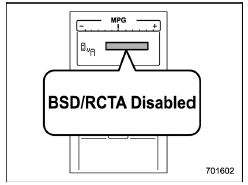
System temporary stop indicator
This indicator appears when the system is used under the following conditions.
- Extremely high or low temperatures
- When abnormal voltage exists for the vehicle battery
- When the radar sensor is significantly misaligned
Once the above conditions are corrected, the system will recover from the temporary stop condition and the indicator will disappear.
If the indicator remains displayed for a prolonged time, have the system inspected at a SUBARU dealer.

 System temporary stop indicator due to reduced radar sensitivity
System temporary stop indicator due to reduced radar sensitivity
This indicator appears when the detectability
of the radar sensors is reduced.
Once the condition is corrected, the
system wi ...
Other materials:
Dtc c2321 transmitter 1 function code abnormal
TIRE PRESSURE MONITORING SYSTEM (DIAGNOSTICS) > Diagnostic Procedure with Diagnostic Trouble Code (DTC)DTC C2321 TRANSMITTER 1 FUNCTION CODE ABNORMALNOTE:Refer to DTC C2324 for diagnostic procedure. Diagnostic Procedure with Diagnostic Trouble Code (DTC) > DTC C2324 TRANSMITTER 4 FUNCTION COD ...
Floor mat
CAUTION
If the floor mat in the Subaru Ascent shifts forward and interferes with pedal
operation, it may lead to loss of control and serious accidents. Follow these safety
precautions carefully.
Always use genuine SUBARU floor mats or equivalent products specifically
designed for the ...
Installation
LIGHTING SYSTEM > Rear Height SensorINSTALLATION1. Install each part in the reverse order of removal.Tightening torque:Sensor assembly - headlight beam leveler: 7.5 N·m (0.76 kgf-m, 5.5 ft-lb)Rear wheel: Except for C4 model120 N·m (12.24 kgf-m, 88.5 ft-lb)Rear wheel: C4 model100 N&m ...
