
Subaru Crosstrek Owners Manual: System temporary stop indicator due to reduced radar sensitivity
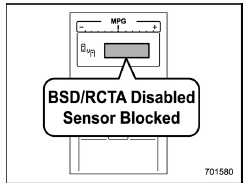
System temporary stop indicator due to reduced radar sensitivity
This indicator appears when the detectability of the radar sensors is reduced.
Once the condition is corrected, the system will recover from the temporary stop condition and the indicator will disappear.
If the indicator remains displayed for a prolonged time, have the system inspected at a SUBARU dealer.
 System temporary stop indicator
System temporary stop indicator
This indicator appears when the system is
used under the following conditions.
Extremely high or low temperatures
When abnormal voltage exists for the
veh ...
 System malfunction indicator
System malfunction indicator
At first, this message will appear
Then this message will appear
This indicator appears when a malfunction
occurs in the system. Contact a SUBARU
dealer and ...
Other materials:
Intake and exhaust valve Specification
MECHANICAL(H4DO) > Intake and Exhaust ValveSPECIFICATIONRefer to “Cylinder Head” for removal and installation procedures of the intake and exhaust valves. Cylinder Head > REMOVAL"> Cylinder Head > INSTALLATION"> ...
Caution
REAR SUSPENSION > General DescriptionCAUTIONPlease clearly understand and adhere to the following general precautions. They must be strictly followed to avoid minor or serious injury to the person doing the work or people in the area.1. EACH PROCEDURE• Wear appropriate work clothing, includ ...
Headlights
For U.S. models
For Canada models
In the Subaru Ascent, the headlight system is controlled using the rotary knob
located at the end of the turn signal lever. By rotating this control, the driver
can easily switch between different lighting modes depending on driving conditions
and vi ...
