
Subaru Crosstrek Service Manual: Switches and harness
Inspection
Blind Spot Detection/Rear Cross Traffic Alert > Switches and Harness
INSPECTION
BSD/RCTA OFF switch
1. Measure the resistance between connector terminals.
Preparation tool:
Circuit tester
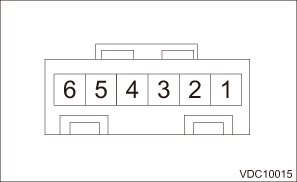
Terminal No. | Inspection conditions | Standard |
1 — 2 | Switch OFF | 1 M? or more |
Switch ON | Less than 1 ? |
2. Apply battery voltage between the connector terminals to check lighting condition of illumination inside the switch.
Terminal No. | Inspection conditions | Specification |
3 (+) — 4 (−) | Apply battery voltage. | Light ON |
3. Replace the BSD/RCTA OFF switch if the inspection result is not within the standard value.
Removal
Blind Spot Detection/Rear Cross Traffic Alert > Switches and Harness
REMOVAL
BSD/RCTA OFF switch
1. Disconnect the ground cable from battery and wait for at least 60 seconds before starting work. NOTE">
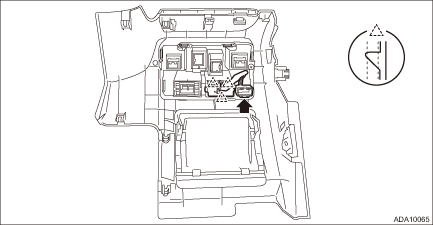
2. Remove the cover assembly - instrument panel LWR driver OUT. Instrument Panel Lower Cover > REMOVAL">
3. Release the connector locks and claws, and remove the BSD/RCTA OFF switch.
 Relay and fuse
Inspection
Blind Spot Detection/Rear Cross Traffic Alert > Relay and FuseINSPECTION1. CHECK FUSE1. Remove the fuse and inspect visually.2. If the fuse is blown out, replace the fuse.NOTE:If the fu ...
 Blind spot detection/rear cross traffic alert
Note
Blind Spot Detection/Rear Cross Traffic Alert > Blind Spot Detection/Rear Cross Traffic AlertNOTEFor procedure of each component in the Subaru Rear Vehicle Detection system, refer to the resp ...
Other materials:
Specification
LIGHTING SYSTEM > General DescriptionSPECIFICATIONNo.DescriptionCapacity and wattageType(1)HeadlightLow beam (halogen type)12 V — 55 WH11Low beam (HID type)12 V — 35 WD2RHigh beam12 V — 60 WHB3Front turn signal light12 V — 21 WWY21WParking light12 V — 5 WW5WSide marker light12 V — 5 W ...
Charge
STARTING/CHARGING SYSTEMS(H4DO) > BatteryCHARGEWARNING:• Do not bring an open flame close to the battery when working.CAUTION:• Prior to charging, corroded terminals should be cleaned with a brush and common caustic soda solution.• Be careful while charging the battery because i ...
Note
LIGHTING SYSTEM > Headlight SystemNOTEFor operation procedures of each component of the headlight system, refer to the respective section.• Headlight Assembly: Headlight Assembly">• Headlight bulb: Headlight Bulb">• Combination switch (light): Combination Swit ...
