
Subaru Ascent 2018-2026 Owner's Manual: Smart Rearview Mirror/compass with HomeLink
Safety precautions
WARNING
- When driving the Subaru Ascent, never depend solely on the Smart Rearview Mirror display. This system, although advanced, has inherent blind spots and limitations, and it is essential to visually confirm surroundings before making maneuvers. Always remain attentive and cautious when relying on electronic assistance.
- Do not attempt to disassemble, modify, or interfere with the Smart Rearview Mirror components, including the camera, wiring, or main unit in the Subaru Ascent. If you notice unusual smells, smoke, or irregular operation, discontinue use immediately and contact an authorized SUBARU dealer for professional inspection.
- Avoid adjusting or operating the Smart Rearview Mirror while the Subaru Ascent is in motion. Distracted operation may lead to dangerous situations, increasing the risk of serious injury or accidents.
CAUTION
- Keep all components of the Smart Rearview Mirror system in the Subaru Ascent away from heat sources or open flames, as exposure may lead to malfunction or fire hazards.
- If any malfunction occurs while using the Smart Rearview Mirror, immediately switch to the standard mirror mode and seek assistance from a SUBARU dealer to prevent further issues.
- Prolonged viewing of the Smart Rearview Mirror display in the Subaru Ascent may cause discomfort or motion sickness for some drivers. Take breaks and rely on direct observation when necessary.
- External lighting conditions such as strong sunlight or headlights from other vehicles may reduce display clarity. If visibility is compromised, switch to mirror mode to maintain a clear rear view.
NOTE
When the moonroof is opened (if equipped):
If intense sunlight makes the Smart Rearview Mirror display difficult to see in the Subaru Ascent, close the sunshade or switch to mirror mode for improved visibility.
Smart Rearview Mirror switches
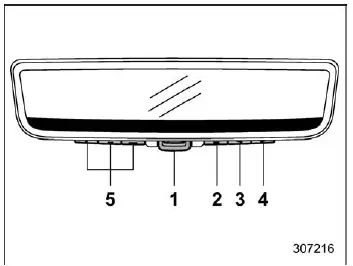
- Mode lever
- Left button
- Center button
- Right button
- HomeLink buttons
How to use the Smart Rearview Mirror
CAUTION
Always adjust the rearview mirror position in the Subaru Ascent before starting to drive.
1) First, switch the Smart Rearview Mirror to mirror mode.
2) Sit properly in the driver's seat and adjust the mirror angle to obtain a clear and natural view of the area behind the Subaru Ascent.
3) After proper adjustment, switch the system back to display mode.
If the mirror is not correctly adjusted beforehand, reflections or glare may appear on the display when switching modes, reducing visibility and overall effectiveness.
To change the mode
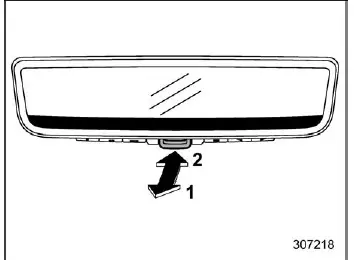
- To activate the display mode in the Subaru Ascent, first ensure the mirror is properly aligned, then pull the mode lever toward you.
- To return to traditional mirror mode, push the lever away from you.
Selecting display mode allows the Subaru Ascent to show a live video feed from the rear-mounted camera, offering an unobstructed and wider field of view.
Switching to mirror mode disables the camera feed and restores the conventional reflective mirror function, which may be preferable under certain lighting or driving conditions.
NOTE
- The Smart Rearview Mirror display mode cannot be used when the ignition switch of the Subaru Ascent is in the "LOCK"/"OFF" or "ACC" position.
- While using display mode, interior reflections may appear on the screen. Adjust the angle of the mirror carefully to minimize glare and maintain clear visibility.
Display adjustment
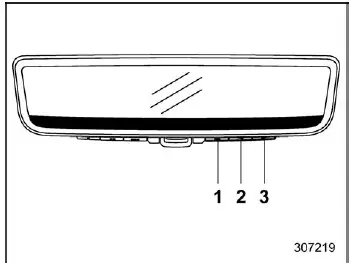
- Left button
- Center button
- Right button
Press any of the control buttons (left, center, or right) to access the main menu and customize display settings according to your preferences in the Subaru Ascent.
NOTE
The main menu cannot be accessed unless the transmission selector is placed in the "P" (Park) position, ensuring that adjustments are made safely while the Subaru Ascent is stationary.
The Smart Rearview Mirror system in the Subaru Ascent enhances visibility and driving awareness by combining camera technology with traditional mirror functionality, allowing drivers to adapt to different environments and maintain optimal rearward vision in all conditions.
 Inside mirror
Normal position
Anti-glare position
In the Subaru Ascent, the interior rearview mirror is designed to provide clear
visibility under various lighting conditions. For standard daytime dri ...
 Brightness adjustment
Setting button: Press the setting button to activate brightness adjustment
mode.
Press this button to decrease the brightness.
Press this button to increase the brightness.
In the Sub ...
Other materials:
Read diagnostic trouble code (dtc) Operation
Blind Spot Detection/Rear Cross Traffic Alert (DIAGNOSTICS) > Read Diagnostic Trouble Code (DTC)OPERATION1. On «Start» display, select «Diagnosis».2. On «Vehicle selection» display, input the target vehicle information and select «Confirmed».3. On «Main Menu» display, select «Each Syst ...
Operation
AUTO HEADLIGHT BEAM LEVELER SYSTEM (DIAGNOSTICS) > Read Current DataOPERATION1. On «Start» display, select «Diagnosis».2. On «Vehicle selection» display, input the target vehicle information and select «Confirmed».3. On «Main Menu» display, select «Each System».4. On «Select System» ...
Dtc p0776 pressure control solenoid "b" performance/stuck off
CONTINUOUSLY VARIABLE TRANSMISSION (DIAGNOSTICS) > Diagnostic Procedure with Diagnostic Trouble Code (DTC)DTC P0776 PRESSURE CONTROL SOLENOID "B" PERFORMANCE/STUCK OFFDTC detecting condition:Detected when two consecutive driving cycles with fault occur.Trouble symptom:• Engine spe ...
